Dalam artikel ini, saya akan menjelaskan dan menunjukkan kepada Anda cara membuat daftar animasi yang indah berdasarkan RecyclerView dan MotionLayout. Saya menggunakan metode serupa di salah satu proyek saya.
Dari penerjemah: Gudang penulis artikel adalah https://github.com/mjmanaog/foodbuddy .
Saya bercabang untuk menerjemahkan. Mungkin "versi Rusia" akan lebih cocok untuk seseorang.
Apa itu MotionLayout?
Singkatnya, MotionLayout adalah subkelas ConstraintLayout yang memungkinkan Anda mendeskripsikan pergerakan dan animasi elemen yang terletak di sana menggunakan XML. Lebih detail - dalam dokumentasi dan di sini dengan contoh.
Jadi, mari kita mulai.
Langkah 1: buat proyek baru
Sebut saja sesuka Anda. Pilih Empty Activity sebagai aktivitas.
Langkah 2: Tambahkan dependensi yang diperlukan
Tambahkan ke file gradle aplikasi:
implementation 'androidx.constraintlayout:constraintlayout:2.0.0-beta1'
Dan mari kita mulai sinkronisasi (Sinkronkan Sekarang di sudut kanan atas).
Langkah 3: Buat tata letak
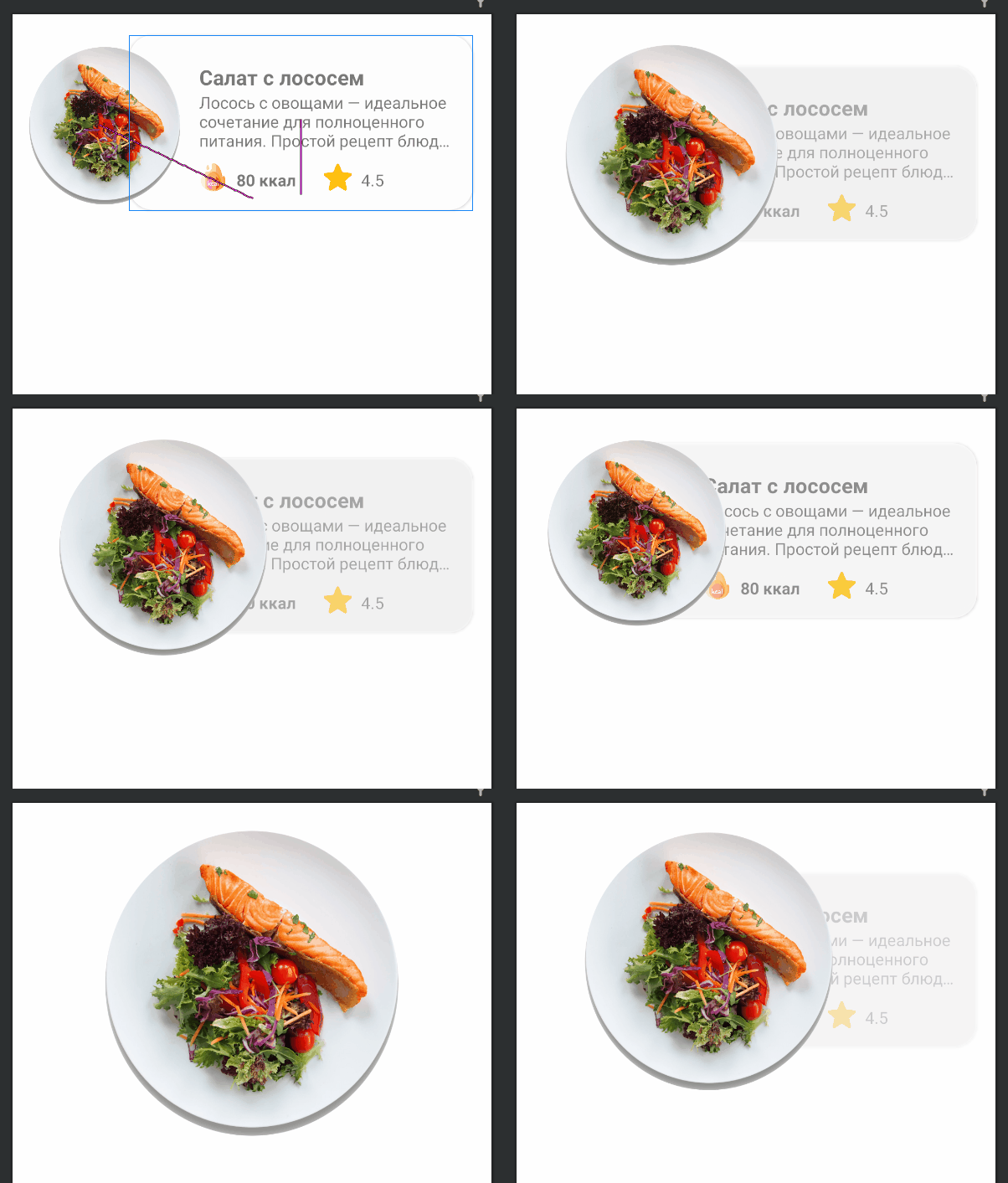
Item daftar kami yang akan datang akan terlihat seperti ini:

res/layout item_food.
<?xml version="1.0" encoding="utf-8"?>
<androidx.constraintlayout.widget.ConstraintLayout xmlns:android="http://schemas.android.com/apk/res/android"
xmlns:app="http://schemas.android.com/apk/res-auto"
xmlns:tools="http://schemas.android.com/tools"
android:id="@+id/clMain"
android:layout_width="match_parent"
android:layout_height="wrap_content"
app:layoutDescription="@xml/item_food_scene">
<ImageView
android:id="@+id/ivFood"
android:layout_width="150dp"
android:layout_height="150dp"
android:layout_marginTop="8dp"
android:elevation="10dp"
android:scaleType="fitXY"
app:layout_constraintBottom_toBottomOf="parent"
app:layout_constraintStart_toStartOf="parent"
app:layout_constraintTop_toTopOf="parent"
app:srcCompat="@drawable/img_salmon_salad" />
<androidx.cardview.widget.CardView
android:id="@+id/cardView"
android:layout_width="match_parent"
android:layout_height="150dp"
android:layout_marginStart="100dp"
android:layout_marginLeft="100dp"
android:layout_marginTop="16dp"
android:layout_marginEnd="16dp"
android:layout_marginRight="16dp"
android:layout_marginBottom="16dp"
app:cardCornerRadius="20dp"
app:layout_constraintBottom_toBottomOf="parent"
app:layout_constraintEnd_toEndOf="parent"
app:layout_constraintStart_toStartOf="parent"
app:layout_constraintTop_toTopOf="parent">
<androidx.constraintlayout.widget.ConstraintLayout
android:layout_width="match_parent"
android:layout_height="match_parent">
<TextView
android:id="@+id/tvTitle"
android:layout_width="0dp"
android:layout_height="wrap_content"
android:layout_marginStart="60dp"
android:layout_marginLeft="60dp"
android:layout_marginTop="24dp"
android:layout_marginEnd="8dp"
android:layout_marginRight="8dp"
android:textSize="18sp"
android:textStyle="bold"
app:layout_constraintEnd_toEndOf="parent"
app:layout_constraintStart_toStartOf="parent"
app:layout_constraintTop_toTopOf="parent"
tools:text=" " />
<TextView
android:id="@+id/tvDescription"
android:layout_width="0dp"
android:layout_height="wrap_content"
android:layout_marginStart="60dp"
android:layout_marginLeft="60dp"
android:layout_marginEnd="16dp"
android:layout_marginRight="8dp"
android:ellipsize="end"
android:maxLines="3"
app:layout_constraintEnd_toEndOf="parent"
app:layout_constraintStart_toStartOf="parent"
app:layout_constraintTop_toBottomOf="@+id/tvTitle"
tools:text=" — . , : , ." />
<TextView
android:id="@+id/tvCalories"
android:layout_width="wrap_content"
android:layout_height="wrap_content"
android:layout_marginStart="8dp"
android:layout_marginLeft="8dp"
android:layout_marginBottom="16dp"
android:textStyle="bold"
app:layout_constraintBottom_toBottomOf="parent"
app:layout_constraintStart_toEndOf="@+id/imageView6"
tools:text="80 " />
<ImageView
android:id="@+id/imageView6"
android:layout_width="24dp"
android:layout_height="24dp"
android:layout_marginStart="60dp"
android:layout_marginLeft="60dp"
android:layout_marginBottom="16dp"
app:layout_constraintBottom_toBottomOf="parent"
app:layout_constraintStart_toStartOf="parent"
app:srcCompat="@drawable/ic_calories" />
<ImageView
android:id="@+id/imageView7"
android:layout_width="24dp"
android:layout_height="24dp"
android:layout_marginStart="24dp"
android:layout_marginLeft="24dp"
android:layout_marginBottom="16dp"
app:layout_constraintBottom_toBottomOf="parent"
app:layout_constraintStart_toEndOf="@+id/tvCalories"
app:srcCompat="@drawable/ic_star" />
<TextView
android:id="@+id/tvRate"
android:layout_width="wrap_content"
android:layout_height="wrap_content"
android:layout_marginStart="8dp"
android:layout_marginLeft="8dp"
android:layout_marginBottom="16dp"
app:layout_constraintBottom_toBottomOf="parent"
app:layout_constraintStart_toEndOf="@+id/imageView7"
tools:text="4.5" />
</androidx.constraintlayout.widget.ConstraintLayout>
</androidx.cardview.widget.CardView>
</androidx.constraintlayout.widget.ConstraintLayout>
4: ConstraintLayout MotionLayout
ConstraintLayout MotionLayout:
Split Design;
(Component Tree) ( — clMain);
Convert to MotionLayout.
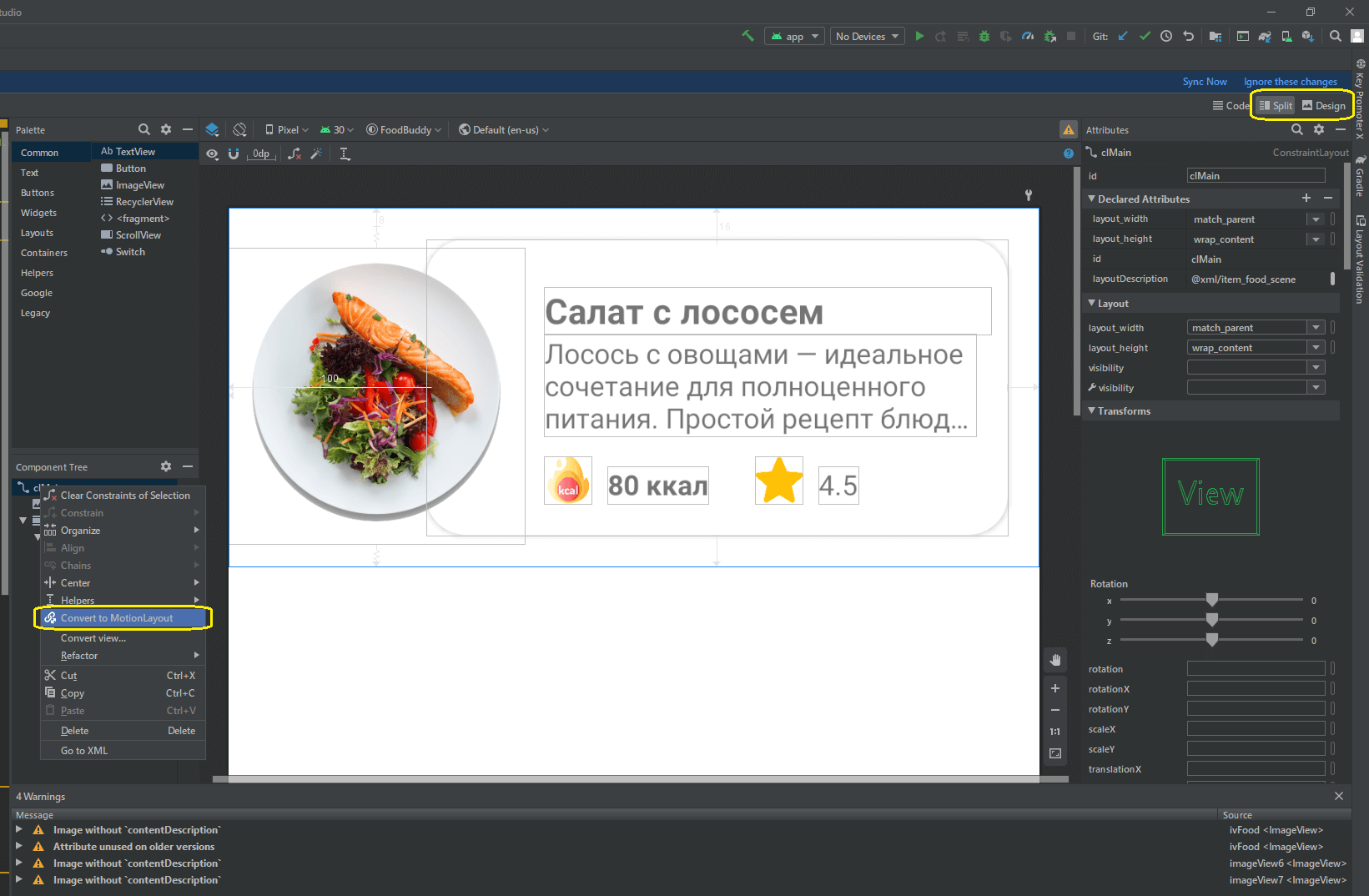
MotionLayout.
item_food
<?xml version="1.0" encoding="utf-8"?>
<androidx.constraintlayout.motion.widget.MotionLayout xmlns:android="http://schemas.android.com/apk/res/android"
xmlns:app="http://schemas.android.com/apk/res-auto"
xmlns:tools="http://schemas.android.com/tools"
android:id="@+id/clMain"
android:layout_width="match_parent"
android:layout_height="wrap_content"
app:layoutDescription="@xml/item_food_scene">
<ImageView
android:id="@+id/ivFood"
android:layout_width="150dp"
android:layout_height="150dp"
android:layout_marginTop="8dp"
android:elevation="10dp"
android:scaleType="fitXY"
app:layout_constraintBottom_toBottomOf="parent"
app:layout_constraintStart_toStartOf="parent"
app:layout_constraintTop_toTopOf="parent"
app:srcCompat="@drawable/img_salmon_salad" />
<androidx.cardview.widget.CardView
android:id="@+id/cardView"
android:layout_width="match_parent"
android:layout_height="150dp"
android:layout_marginStart="100dp"
android:layout_marginLeft="100dp"
android:layout_marginTop="16dp"
android:layout_marginEnd="16dp"
android:layout_marginRight="16dp"
android:layout_marginBottom="16dp"
app:cardCornerRadius="20dp"
app:layout_constraintBottom_toBottomOf="parent"
app:layout_constraintEnd_toEndOf="parent"
app:layout_constraintStart_toStartOf="parent"
app:layout_constraintTop_toTopOf="parent">
<androidx.constraintlayout.widget.ConstraintLayout
android:layout_width="match_parent"
android:layout_height="match_parent">
<TextView
android:id="@+id/tvTitle"
android:layout_width="0dp"
android:layout_height="wrap_content"
android:layout_marginStart="60dp"
android:layout_marginLeft="60dp"
android:layout_marginTop="24dp"
android:layout_marginEnd="8dp"
android:layout_marginRight="8dp"
android:textSize="18sp"
android:textStyle="bold"
app:layout_constraintEnd_toEndOf="parent"
app:layout_constraintStart_toStartOf="parent"
app:layout_constraintTop_toTopOf="parent"
tools:text=" " />
<TextView
android:id="@+id/tvDescription"
android:layout_width="0dp"
android:layout_height="wrap_content"
android:layout_marginStart="60dp"
android:layout_marginLeft="60dp"
android:layout_marginEnd="16dp"
android:layout_marginRight="8dp"
android:ellipsize="end"
android:maxLines="3"
app:layout_constraintEnd_toEndOf="parent"
app:layout_constraintStart_toStartOf="parent"
app:layout_constraintTop_toBottomOf="@+id/tvTitle"
tools:text=" — . , : , ." />
<TextView
android:id="@+id/tvCalories"
android:layout_width="wrap_content"
android:layout_height="wrap_content"
android:layout_marginStart="8dp"
android:layout_marginLeft="8dp"
android:layout_marginBottom="16dp"
android:textStyle="bold"
app:layout_constraintBottom_toBottomOf="parent"
app:layout_constraintStart_toEndOf="@+id/imageView6"
tools:text="80 " />
<ImageView
android:id="@+id/imageView6"
android:layout_width="24dp"
android:layout_height="24dp"
android:layout_marginStart="60dp"
android:layout_marginLeft="60dp"
android:layout_marginBottom="16dp"
app:layout_constraintBottom_toBottomOf="parent"
app:layout_constraintStart_toStartOf="parent"
app:srcCompat="@drawable/ic_calories" />
<ImageView
android:id="@+id/imageView7"
android:layout_width="24dp"
android:layout_height="24dp"
android:layout_marginStart="24dp"
android:layout_marginLeft="24dp"
android:layout_marginBottom="16dp"
app:layout_constraintBottom_toBottomOf="parent"
app:layout_constraintStart_toEndOf="@+id/tvCalories"
app:srcCompat="@drawable/ic_star" />
<TextView
android:id="@+id/tvRate"
android:layout_width="wrap_content"
android:layout_height="wrap_content"
android:layout_marginStart="8dp"
android:layout_marginLeft="8dp"
android:layout_marginBottom="16dp"
app:layout_constraintBottom_toBottomOf="parent"
app:layout_constraintStart_toEndOf="@+id/imageView7"
tools:text="4.5" />
</androidx.constraintlayout.widget.ConstraintLayout>
</androidx.cardview.widget.CardView>
</androidx.constraintlayout.motion.widget.MotionLayout>
res xml item_food_scene.xml:
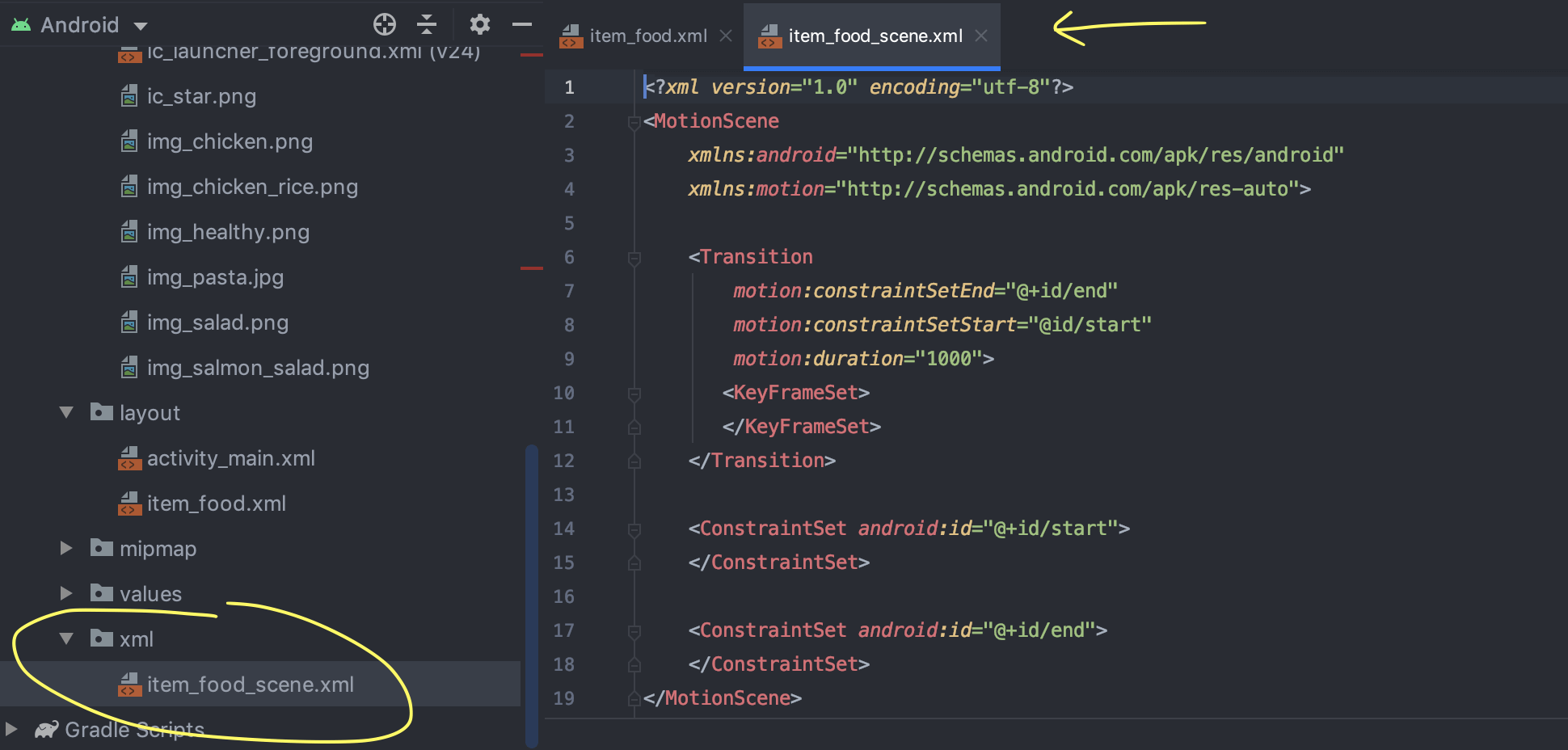
(Warnings ), ImageView contentDescription. , XML- ( , ).
5: ImageView

ivFood (ImageView );
MotionLayout end;
ivFood (End) (End) ;
;
layout_height layout_width 300dp.
: ImageView ( , ) , : ( 150dp 300dp).
6: ,
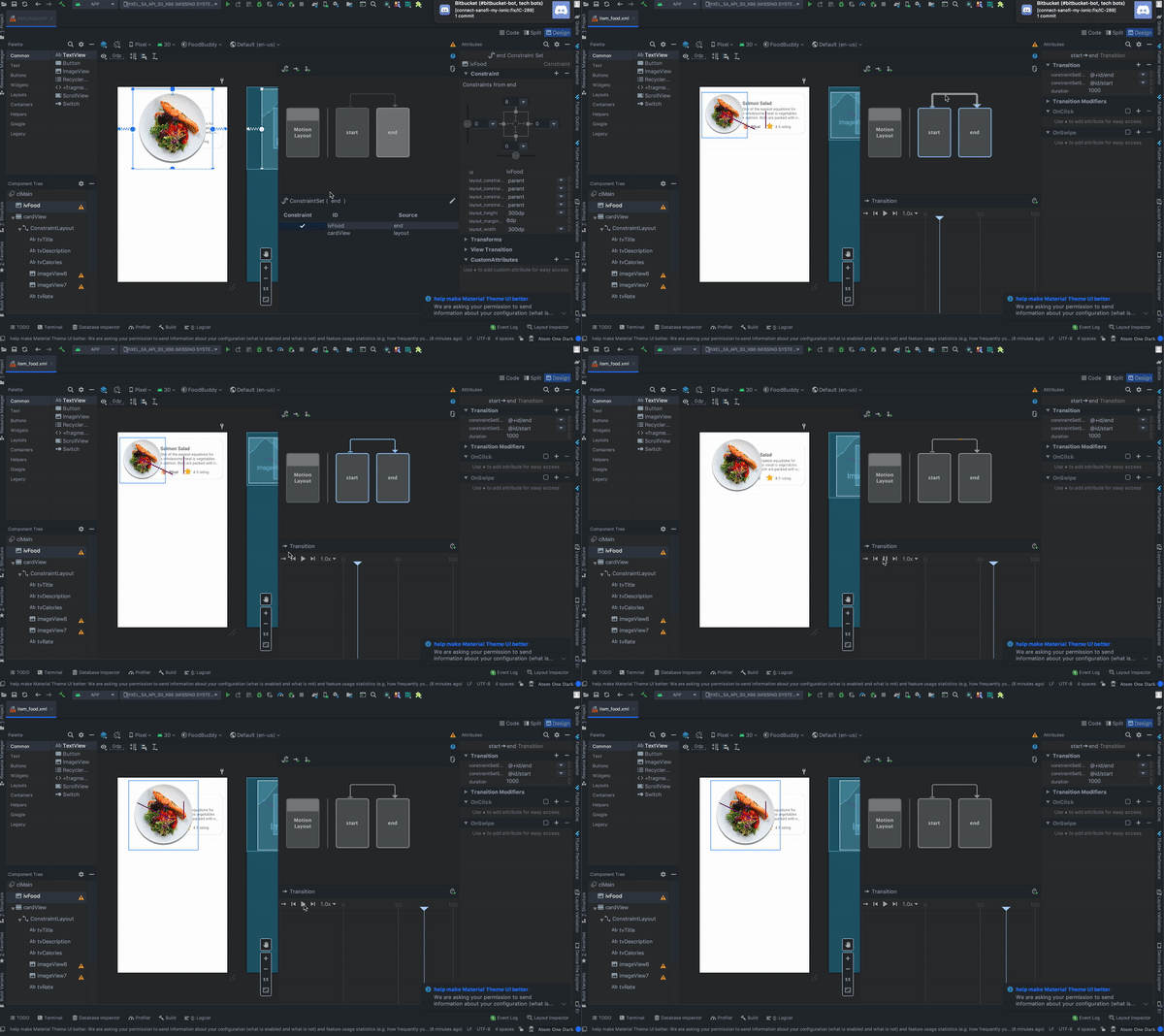
, :
MotionLayout , start end;
Transition;
Play, .
7: CardView
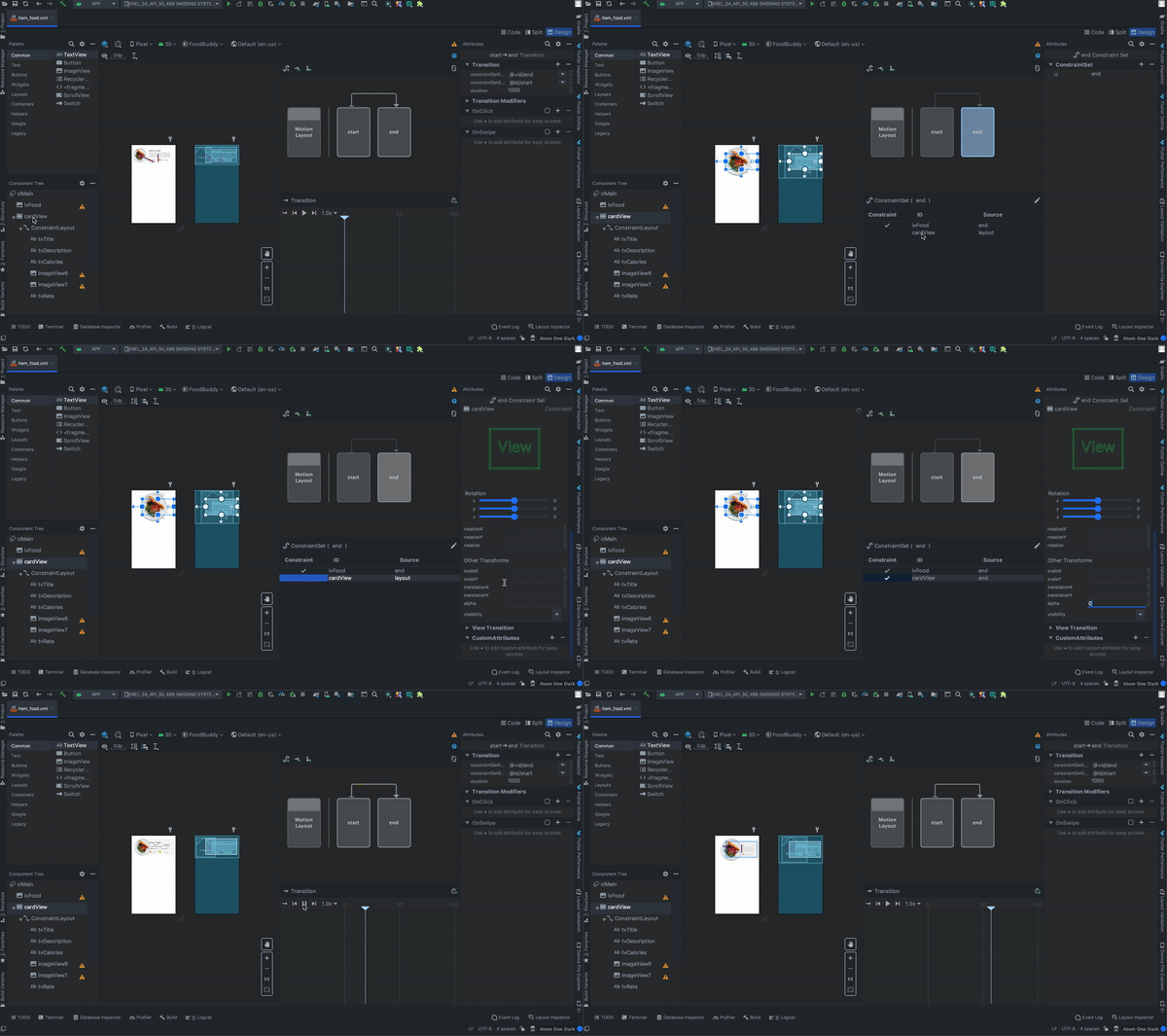
:
cardView (constraintView , , );
MotionLayout end;
cardView ConstraintSet;
Transforms;
alpha 0.
: (end) (start) alpha. ( ).
8:
, :
OnClick ( «+»);
targetId ivFood;
;
ClickAction toggle.
:
9: RecyclerView activity_main.xml
<?xml version="1.0" encoding="utf-8"?>
<androidx.constraintlayout.widget.ConstraintLayout xmlns:android="http://schemas.android.com/apk/res/android"
xmlns:app="http://schemas.android.com/apk/res-auto"
android:layout_width="match_parent"
android:layout_height="match_parent">
<androidx.recyclerview.widget.RecyclerView
android:id="@+id/rvMain"
android:layout_width="match_parent"
android:layout_height="match_parent"
app:layout_constraintBottom_toBottomOf="parent"
app:layout_constraintEnd_toEndOf="parent"
app:layout_constraintStart_toStartOf="parent"
app:layout_constraintTop_toTopOf="parent" />
</androidx.constraintlayout.widget.ConstraintLayout>
10:
package com.mjmanaog.foodbuddy.data.model
import com.mjmanaog.foodbuddy.R
data class FoodModel(
val title: String,
val description: String,
val calories: String,
val rate: String,
val imgId: Int
)
val foodDummyData: ArrayList<FoodModel> = arrayListOf(
FoodModel(
" ",
" — . , : , .",
"80 ",
"4.5",
R.drawable.img_salmon_salad
),
FoodModel(
" -",
" , , .",
"80 ",
"4.5",
R.drawable.img_chicken
),
FoodModel(
" ",
" — . , . .",
"80 ",
"4.5",
R.drawable.img_chicken_rice
),
FoodModel(
" ",
" , ( ), , , , , , , .",
"80 ",
"4.5",
R.drawable.img_salad
),
FoodModel(
" ",
" — . , : , .",
"80 ",
"4.5",
R.drawable.img_healthy
)
)
11: ViewHolder
. FoodModel
12: RecyclerView
class MainActivity : AppCompatActivity() {
private var foodAdapter: FoodAdapter = FoodAdapter()
override fun onCreate(savedInstanceState: Bundle?) {
super.onCreate(savedInstanceState)
setContentView(R.layout.activity_main)
rvMain.layoutManager = LinearLayoutManager(this, RecyclerView.VERTICAL, false)
rvMain.adapter = foodAdapter
foodAdapter.addAll(foodDummyData)
}
}
Sebagai hasil dari tindakan sederhana ini, kami mendapatkan animasi berikut:
Saya tidak menambahkan GIF dari artikel, karena
Dia membawa 11 MB.
Sesuatu yang lain
File item_food_scene.xml berisi deskripsi animasi yang kami konfigurasikan. Tidak ada yang mengganggu Anda untuk membuat dan mengedit animasi dalam file adegan secara manual.
Semoga materi dari artikel ini bermanfaat bagi seseorang. Akan keren jika Anda mempelajari sesuatu yang baru darinya.
Terima kasih atas perhatian Anda.