Setiap programmer C ++ harus dapat menemukan kebocoran memori. C ++ adalah bahasa yang kompleks, membuat kesalahan itu mudah, dan menemukannya bisa menjadi pekerjaan rumah. Ini terutama berlaku untuk kebocoran memori. Situasi dengan menangkap kebocoran memori hanya menjadi lebih buruk jika pustaka Qt digunakan dalam kode C ++.
Artikel ini dikhususkan untuk berbagai alat yang dapat digunakan dengan berbagai tingkat keberhasilan untuk menangkap kebocoran memori di aplikasi C ++ / Qt (desktop). Alat akan ditinjau bersama dengan Visual Studio 2019 IDE. Artikel ini tidak akan membahas semua alat yang memungkinkan, tetapi hanya alat yang paling populer dan efektif.
Tim kami telah mempelajari alat-alat semacam itu sejak lama dan dekat serta menggunakannya dalam pekerjaan mereka. Jumlah kode yang memungkinkan untuk menguji alat tersebut adalah sekitar 1,5 juta baris. Berdasarkan pengalaman praktis yang luas, kami akan memberi tahu Anda tentang pro dan kontra dari alat yang berbeda, memberi tahu Anda apa yang dapat mereka temukan dan apa yang terlalu sulit, berbicara tentang nuansa yang tidak jelas dan, yang paling penting, menyusun tabel perbandingan ringkasan berdasarkan contoh nyata. Kami akan mencoba membuat Anda up to date secepat dan sesederhana mungkin (tunjukkan awal yang cepat), jadi meskipun Anda, pembaca, tidak pernah mencari kebocoran memori, artikel ini akan membantu Anda mencari tahu dan menemukan kebocoran pertama Anda di beberapa jam. Pergilah!
Apa masalahnya?
Kebocoran memori adalah situasi ketika memori dialokasikan (misalnya, oleh operator baru) dan tidak dihapus secara keliru oleh operator / fungsi hapus yang sesuai (misalnya, hapus).
Contoh 1.
int* array = nullptr;
for (int i = 0; i < 5; i++)
{
array = new int[10];
}
delete[] array;
Ada kebocoran di sini saat mengalokasikan memori untuk 4 larik pertama. 160 byte bocor. Array terakhir dihapus dengan benar. Jadi, kebocorannya hanya pada satu baris:
array = new int[10];
Contoh 2.
class Test
{
public:
Test()
{
a = new int[100];
b = new int[300];
}
~Test()
{
delete[] a;
delete[] b;
}
private:
int* a;
int* b;
};
int main()
{
Test* test = new Test;
return 0;
}
Sudah ada lebih banyak kebocoran di sini: memori untuk a (400 byte), untuk b (1200 byte) dan untuk pengujian (16 byte untuk x64) tidak dihapus. Namun, penghapusan a dan b disediakan dalam kode, tetapi itu tidak terjadi karena tidak adanya panggilan ke destruktor Uji. Jadi, ada tiga kebocoran, tetapi kesalahan yang mengarah ke kebocoran ini hanya satu, dan itu dihasilkan oleh saluran.
Test* test = new Test;
Pada saat yang sama, tidak ada kesalahan dalam kode kelas Tes.
Contoh 3.
Mari kita kelas Qt, seperti ini:
class InfoRectangle : public QLabel
{
Q_OBJECT
public:
InfoRectangle(QWidget* parent = nullptr);
private slots:
void setInfoTextDelayed();
private:
QTimer* _textSetTimer;
};
InfoRectangle::InfoRectangle(QWidget* parent)
: QLabel(parent)
{
_textSetTimer = new QTimer(this);
_textSetTimer->setInterval(50);
connect(_textSetTimer, &QTimer::timeout, this, &InfoRectangle::setInfoTextDelayed);
}
void InfoRectangle::setInfoTextDelayed()
{
// do anything
setVisible(true);
}
Mari kita juga memiliki alokasi memori di suatu tempat dalam kode:
InfoRectangle* rectangle = new InfoRectangle();
, delete? , Qt. , , :
mnuLayout->addWidget(rectangle);
rectangle->setParent(this);
– . , : , . – InfoRectangle
. – QTimer,
_textSetTimer
Qt. , – connect
.
, new :
template <typename Func1, typename Func2>
static inline QMetaObject::Connection connect(
const typename QtPrivate::FunctionPointer<Func1>::Object *sender, Func1 signal,
const typename QtPrivate::FunctionPointer<Func2>::Object *receiver, Func2 slot,
Qt::ConnectionType type = Qt::AutoConnection)
{
typedef QtPrivate::FunctionPointer<Func1> SignalType;
typedef QtPrivate::FunctionPointer<Func2> SlotType;
const int *types = nullptr;
if (type == Qt::QueuedConnection || type == Qt::BlockingQueuedConnection)
types = QtPrivate::ConnectionTypes<typename SignalType::Arguments>::types();
return connectImpl(sender, reinterpret_cast<void **>(&signal),
receiver, reinterpret_cast<void **>(&slot),
new QtPrivate::QSlotObject<Func2, typename QtPrivate::List_Left<
typename SignalType::Arguments, SlotType::ArgumentCount>::Value,
typename SignalType::ReturnType>(slot),
type, types, &SignalType::Object::staticMetaObject);
}
, . , . , Qt, connect, Qt, , , .
: , . . – , , , , , ( ). , . , , .
, , , ? …
– , , , . . , . , . , () . , , .
|
|
|
|
|
- |
|
|
1.5 |
: , 1, 2, , |
|
7 |
253 |
1. .
, .
Intel Inspector
Intel Inspector – , Visual Studio . Intel Inspector , , , .
Intel Inspector Intel Parallel Studio 2019, Intel Inspector, . Visual Studio 2019 Intel Parallel Studio. , Intel Inspector Visual Studio (. 1).
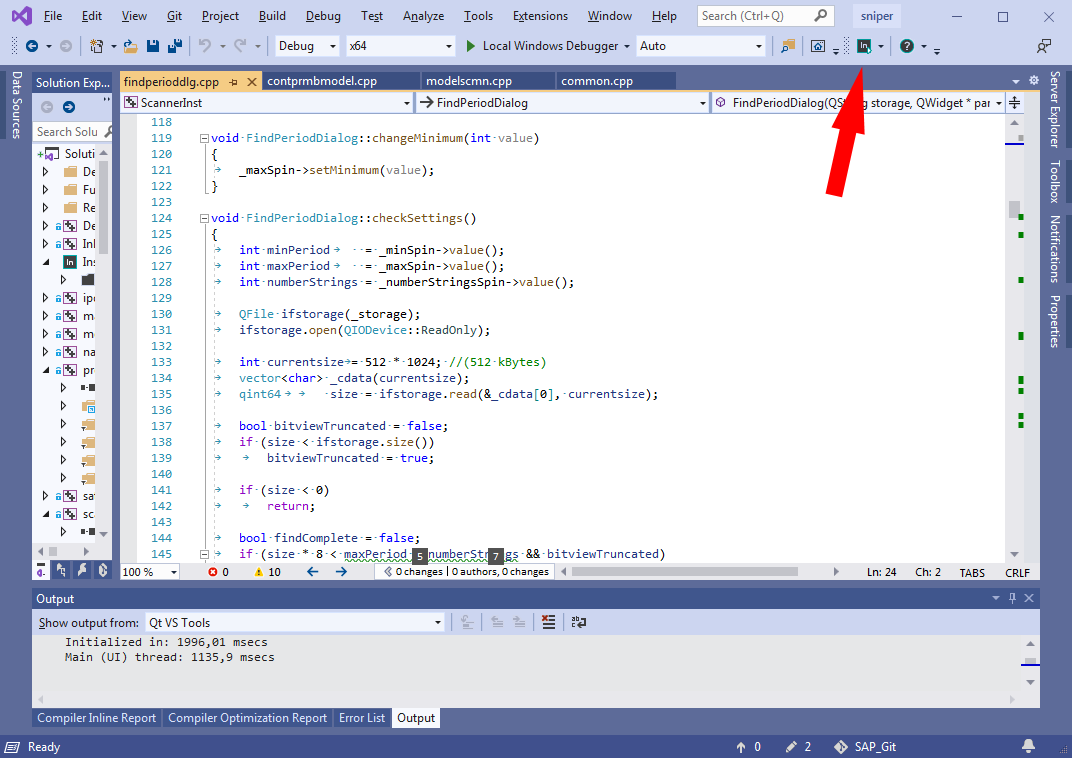
Intel Inspector’ , - «Intel Inspector».
- Intel Inspector . «Detect Leaks» , (. 2). - , , , , .
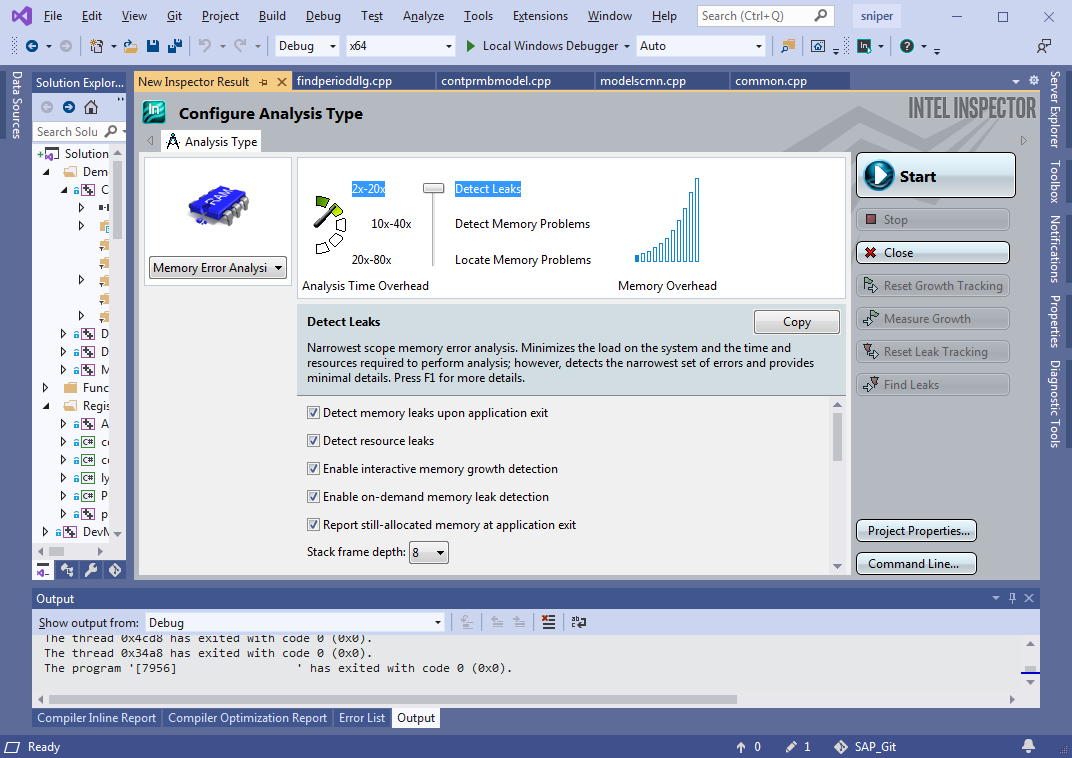
«Start», . , ( , «» ), . , , . , . , (. . 1). , Intel Inspector (. 3):
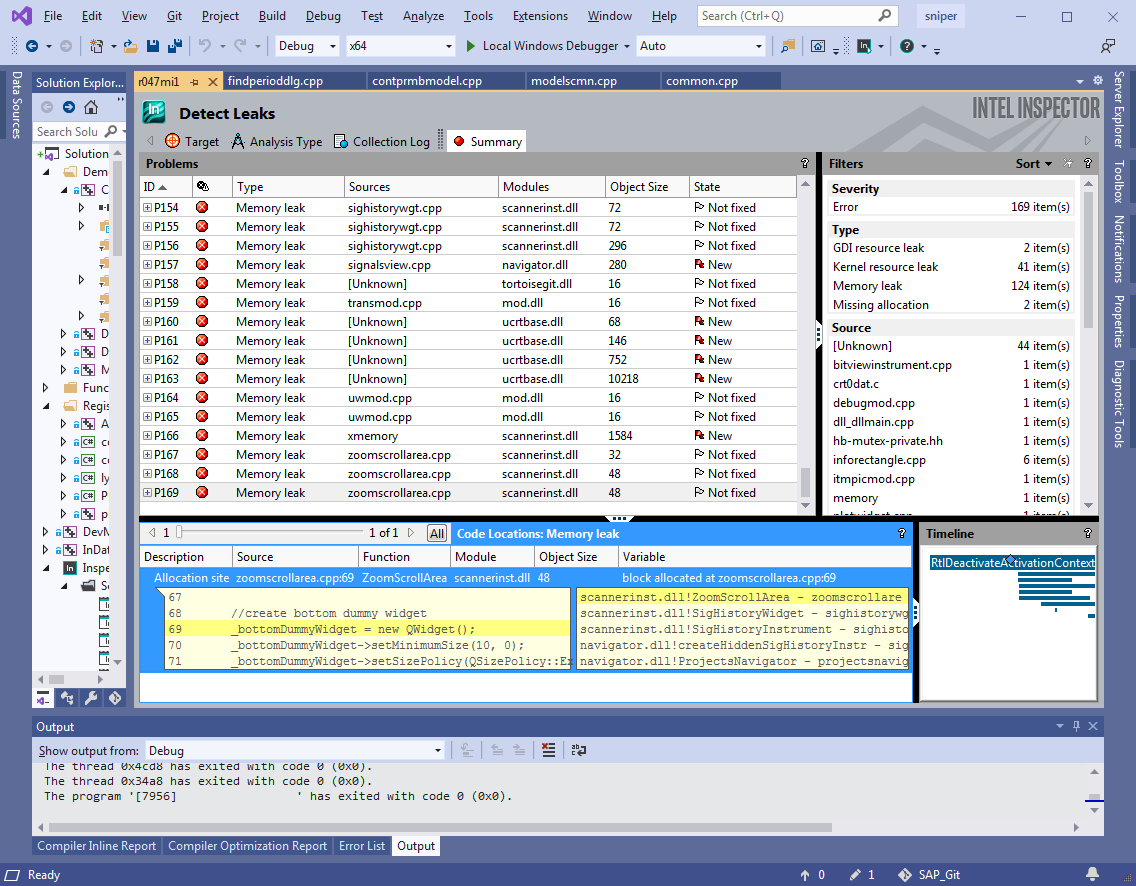
, , , call-stack . , . . – IDE!
, . debug , release . ++- , debug , release ( 20 ), debug' . – release (, ), . Intel Inspector' , . , release , .
: Intel Inspector ( ) , debug release. (. 1).
|
|
, |
|
|
|
|
||
Release c |
10 |
70 |
7 |
Debug |
101 |
973 |
9,6 |
2. Intel Inspector`
, . . , , , , , , 10 . ( debug), 100 . ( , ) .
– ? ? , Intel Inspector`?
|
|
- : n |
|
: r |
: (n-r)/n |
: N/n |
||
: N |
|
|
|||||
Release c |
7 |
192 |
168 |
24 |
0 |
1 (100%) |
27 |
Debug |
7 |
129 |
107 |
22 |
0 |
1 (100%) |
18 |
3. Intel Inspector
, Intel Inspector . , . . , Intel Inspector, , , , , «» ( 2 3, . ).
, Intel Inspector , – . , , release , debug. , , – , .
.
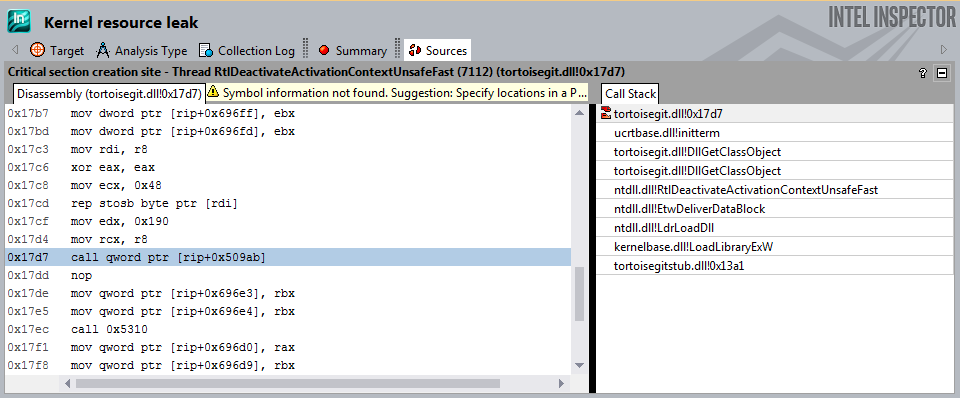
1. dll.
Intel Inspector dll, . , .
2. aligned_malloc
.
m_pVitData = (VITDEC_DATA*)_aligned_malloc(sizeof(VITDEC_DATA), 16);
m_pDcsnBuf = (byte*)_aligned_malloc(64 * (VITM6_BUF_LEN + VITM6_MAX_WND_LEN), 16);
...
_aligned_free(m_pDcsnBuf);
_aligned_free(m_pVitData);
, "" release, debug .
3. Pragma.
#pragma omp parallel for schedule(dynamic)
for (int portion = 0; portion < portionsToProcess; ++portion)
{
…
}
#pragma
!
, - ( Intel Inspector, VS, ..) , – . , (<50000 ) Intel Inspector . – , .
Intel Inspector – , ( ), . release , ( , ), debug. debug .
, Intel Inspector . , , . , «» Intel Inspector, , «» .
Visual Leak Detector
Visual Leak Detector ( VLD) – , Output (IDE Visual Studio 2019) .
, Visual Studio .
VLD VLD, , , .. .
VLD ( vld-2.5.1-setup.exe) , ( Path Visual Studio). .
VLD dll- Visual Studio 2019, dbghelp.dll
C:\Program Files (x86)\Microsoft Visual Studio\2019\Enterprise\Common7\IDE\Extensions\TestPlatform\Extensions\Cpp\x64
C:\Program Files (x86)\Visual Leak Detector\bin\Win64
.
:
#pragma once //#define LEAKS_DETECTION #ifdef LEAKS_DETECTION #include <vld.h> #endif
, , .
(pp) . , solution.
#define LEAKS_DETECTION
solution. (F5) , . debug. Release c .
VLD Output. , call-stack , .
, VLD
---------- Block 652047 at 0x0000000027760070: 8787200 bytes ----------
Leak Hash: 0x02B5C300, Count: 1, Total 8787200 bytes
Call Stack (TID 30996):
ucrtbased.dll!malloc()
d:\agent\_work\63\s\src\vctools\crt\vcstartup\src\heap\new_array.cpp (29): SniperCore.dll!operator new[]()
D:\SOURCE\SAP_Git\sap_win64\core\alg\fbg\ddec\S2Ldfg.cpp (445): SniperCore.dll!CS2Ldfg::CreateLLRTbls() + 0xD bytes
D:\SOURCE\SAP_Git\sap_win64\core\alg\fbg\ddec\S2Ldfg.cpp (217): SniperCore.dll!CS2Ldfg::SetModeEB()
D:\SOURCE\SAP_Git\sap_win64\core\alg\fbg\ddec\S2Ldfg.cpp (1447): SniperCore.dll!CS2Ldfg::Set() + 0xA bytes
D:\SOURCE\SAP_Git\sap_win64\core\alg\fbg\ddec\ddec.cpp (509): SniperCore.dll!DFBase::instanceS2Dec()
D:\SOURCE\SAP_Git\sap_win64\core\alg\fbg\ddec\ddec.cpp (58): SniperCore.dll!DFBase::DFBase() + 0xF bytes
D:\SOURCE\SAP_Git\sap_win64\core\alg\fbg\ddec\ddec.cpp (514): SniperCore.dll!DgbS5FecAnlzr::DgbS5FecAnlzr() + 0xA bytes
D:\SOURCE\SAP_Git\sap_win64\core\alg\fbg\fbganalyser.cpp (45): SniperCore.dll!TechnicalLayer::FBGAnalyser::FBGAnalyser() + 0x21 bytes
D:\SOURCE\SAP_Git\sap_win64\core\engine\handlers\fbganalysishandler.cpp (218): SniperCore.dll!TechnicalLayer::FBGAnalysisHandler::init() + 0x2A bytes
D:\SOURCE\SAP_Git\sap_win64\core\engine\handlers\fbganalysishandler.cpp (81): SniperCore.dll!TechnicalLayer::FBGAnalysisHandler::enqueueRequest()
D:\SOURCE\SAP_Git\sap_win64\core\engine\threadedhandler2.cpp (57): SniperCore.dll!TotalCore::ThreadedHandler2::run()
Qt5Cored.dll!QTextStream::realNumberPrecision() + 0x89E8E bytes
kernel32.dll!BaseThreadInitThunk() + 0xD bytes
ntdll.dll!RtlUserThreadStart() + 0x1D bytes
Data:
00 00 00 00 01 01 01 01 01 01 01 02 02 02 02 02 ........ ........
02 02 03 03 03 03 03 03 03 04 04 04 04 04 04 04 ........ ........
05 05 05 05 05 05 05 05 06 06 06 06 06 06 06 07 ........ ........
07 07 07 07 07 07 08 08 08 08 08 08 08 09 09 09 ........ ........
09 09 09 09 0A 0A 0A 0A 0A 0A 0A 0B 0B 0B 0B 0B ........ ........
0B 0B 0C 0C 0C 0C 0C 0C 0C 0D 0D 0D 0D 0D 0D 0D ........ ........
0E 0E 0E 0E 0E 0E 0E 0E 0F 0F 0F 0F 0F 0F 0F 10 ........ ........
10 10 10 10 10 10 11 11 11 11 11 11 11 12 12 12 ........ ........
EE EE EE EE EF EF EF EF EF EF EF F0 F0 F0 F0 F0 ........ ........
F0 F0 F1 F1 F1 F1 F1 F1 F1 F2 F2 F2 F2 F2 F2 F2 ........ ........
F3 F3 F3 F3 F3 F3 F3 F3 F4 F4 F4 F4 F4 F4 F4 F5 ........ ........
F5 F5 F5 F5 F5 F5 F6 F6 F6 F6 F6 F6 F6 F7 F7 F7 ........ ........
F7 F7 F7 F7 F8 F8 F8 F8 F8 F8 F8 F9 F9 F9 F9 F9 ........ ........
F9 F9 FA FA FA FA FA FA FA FB FB FB FB FB FB FB ........ ........
FC FC FC FC FC FC FC FC FD FD FD FD FD FD FD FE ........ ........
FE FE FE FE FE FE FF FF FF FF FF FF FF 00 00 00 ........ ........
---------- Block 2430410 at 0x000000002E535B70: 48 bytes ----------
Leak Hash: 0x7062B343, Count: 1, Total 48 bytes
Call Stack (TID 26748):
ucrtbased.dll!malloc()
d:\agent\_work\63\s\src\vctools\crt\vcstartup\src\heap\new_scalar.cpp (35): SniperCore.dll!operator new() + 0xA bytes
C:\Program Files (x86)\Microsoft Visual Studio\2019\Enterprise\VC\Tools\MSVC\14.28.29333\include\xmemory (78): SniperCore.dll!std::_Default_allocate_traits::_Allocate()
C:\Program Files (x86)\Microsoft Visual Studio\2019\Enterprise\VC\Tools\MSVC\14.28.29333\include\xmemory (206): SniperCore.dll!std::_Allocate<16,std::_Default_allocate_traits,0>() + 0xA bytes
C:\Program Files (x86)\Microsoft Visual Studio\2019\Enterprise\VC\Tools\MSVC\14.28.29333\include\xmemory (815): SniperCore.dll!std::allocator<TotalCore::TaskResult *>::allocate()
C:\Program Files (x86)\Microsoft Visual Studio\2019\Enterprise\VC\Tools\MSVC\14.28.29333\include\vector (744): SniperCore.dll!std::vector<TotalCore::TaskResult *,std::allocator<TotalCore::TaskResult *> >::_Emplace_reallocate<TotalCore::TaskResult * const &>() + 0xF bytes
C:\Program Files (x86)\Microsoft Visual Studio\2019\Enterprise\VC\Tools\MSVC\14.28.29333\include\vector (708): SniperCore.dll!std::vector<TotalCore::TaskResult *,std::allocator<TotalCore::TaskResult *> >::emplace_back<TotalCore::TaskResult * const &>() + 0x1F bytes
C:\Program Files (x86)\Microsoft Visual Studio\2019\Enterprise\VC\Tools\MSVC\14.28.29333\include\vector (718): SniperCore.dll!std::vector<TotalCore::TaskResult *,std::allocator<TotalCore::TaskResult *> >::push_back()
D:\SOURCE\SAP_Git\sap_win64\include\core\engine\task.h (119): SniperCore.dll!TotalCore::LongPeriodTask::setTmpResult()
D:\SOURCE\SAP_Git\sap_win64\include\core\engine\discretestephandler.h (95): SniperCore.dll!TotalCore::DiscreteStepHandler::setResult()
D:\SOURCE\SAP_Git\sap_win64\core\engine\handlers\prmbdtcthandler.cpp (760): SniperCore.dll!TechnicalLayer::PrmbDtctHandler::setContResult() + 0x1A bytes
D:\SOURCE\SAP_Git\sap_win64\core\engine\handlers\prmbdtcthandler.cpp (698): SniperCore.dll!TechnicalLayer::PrmbDtctHandler::processPortion()
D:\SOURCE\SAP_Git\sap_win64\core\engine\threadedhandler2.cpp (109): SniperCore.dll!TotalCore::ThreadedHandler2::tryProcess()
D:\SOURCE\SAP_Git\sap_win64\core\engine\threadedhandler2.cpp (66): SniperCore.dll!TotalCore::ThreadedHandler2::run()
Qt5Cored.dll!QTextStream::realNumberPrecision() + 0x89E8E bytes
kernel32.dll!BaseThreadInitThunk() + 0xD bytes
ntdll.dll!RtlUserThreadStart() + 0x1D bytes
Data:
10 03 51 05 00 00 00 00 B0 B4 85 09 00 00 00 00 ..Q..... ........
60 9D B9 08 00 00 00 00 D0 1B 24 06 00 00 00 00 `....... ..$.....
30 B5 4F 11 00 00 00 00 CD CD CD CD CD CD CD CD 0.O..... ........
:
Visual Leak Detector detected 383 memory leaks (253257876 bytes).
Largest number used: 555564062 bytes.
Total allocations: 2432386151 bytes.
Visual Leak Detector is now exiting.
, ,
No memory leaks detected.
Visual Leak Detector is now exiting.
debug : VLD . , release ( ) vld . . 4 release debug. (. . 1).
|
|
, |
, VLD, |
|
VLD |
VLD |
||
Debug |
101 |
172 |
1,7 |
Release c |
10 |
- |
- |
4. VLD
? ? , VLD?
|
|
- : n |
|
: r |
: (n-r)/n |
: N/n |
||
: N |
|
|
|||||
Debug |
7 |
185 |
185 |
0 |
0 |
1 (100%) |
26 |
5. VLD
, VLD . . , VLD, , , , , «» ( 2 3, . ). - , ( ), «». , , :
connect(arrowKeyHandler, &ArrowKeyHandler::upPressed,
[this] { selectNeighbourSignal(TopSide); });
, , , , connect (. 3). - .
, VLD , . continuous integration.
Visual Leak Detector – , ( ) . VLD , , , Intel Inspector debug. , «» , continuous integration.
. , vld . , , .
VS 2019
IDE Visual Studio 2019 – Diagnostic Tools. (snapshots). () . , , , .
( debug release c ). Diagnostic Tools. Memory Usage, Heap Profiling Take Snapshot.
, - , , . , , . , .
Break All , , , .
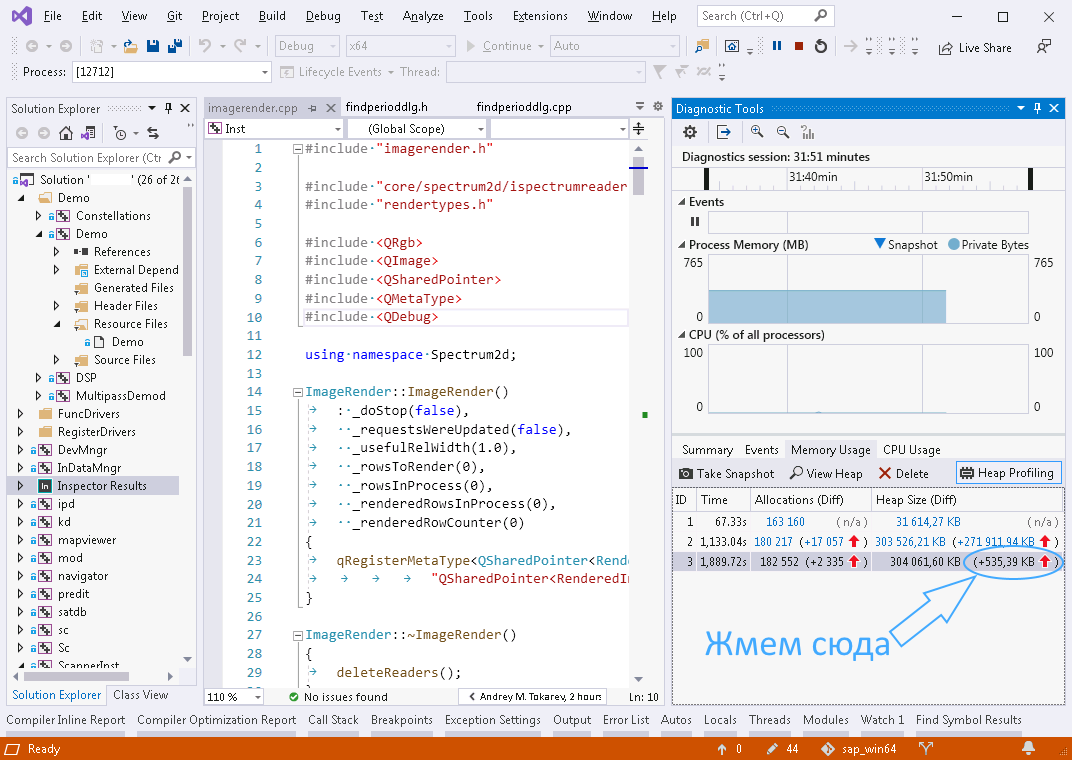
(. . 5, ). ViewMode -> Stacks View ( Types View), :
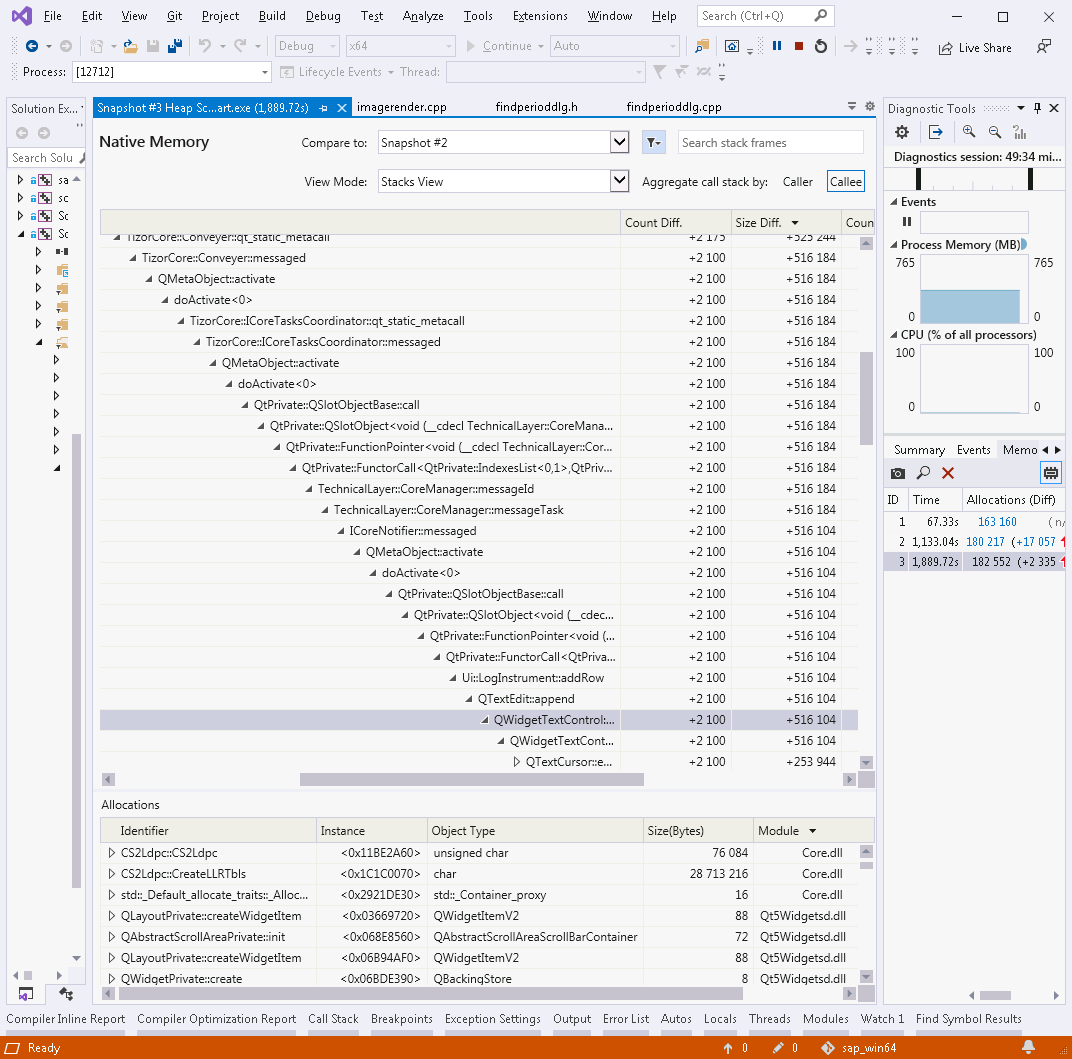
, Qt: , Qt. , . (. . 1), . , .
, (, ..). , , . ( ) .
PVS-Studio
, , - PVS-Studio. , . , solution. , «», .
. PVS-Studio Visual Studio 2019, «Extensions».
solution` Extensions->PVS-Studio->Check. «PVS-Studio» , «» High, Medium Low.
, , PVS-Studio . , , : V599, V680, V689, V701, V772, V773, V1005, V1023 ( . ).
Visual Studio Tools -> Options -> PVS-Studio «Detectable Errors (C++)» , ( «Hide All», ) – . 8. «Detectable Errors (C#)» ( «Hide All» «Disabled»).
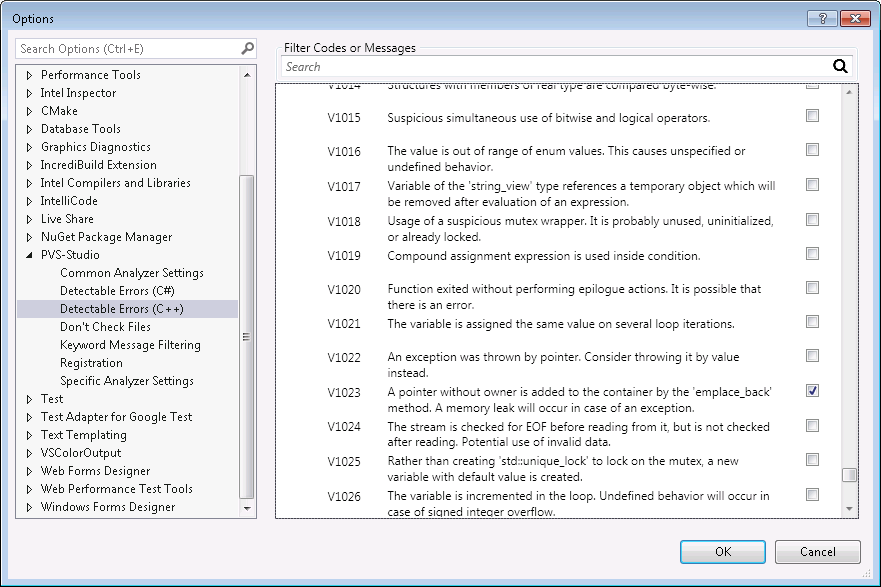
, , PVS-Studio High, Medium Low .
, , 1.5 2269 . Intel Core i7 4790K. (debug release) , ( , - , ).
|
- : n |
|
: r |
: (n-r)/n |
||
|
|
|
|
||||
30 |
7 |
2 |
0 |
2 |
7 |
0 % |
6. PVS-Studio
, - (Intel Inspector, VLD). , . , PVS-Studio .
, 2 – Intel Inspector Visual Leak Detector. :
|
|
Intel Inspector |
VLD |
|
|
|
|
|
|
() |
|
|
|
|
|
debug |
9.6 |
1,7 |
release |
7 |
- |
Apakah itu menemukan kebocoran nyata dalam debug |
Ya semua. Redundansi hasil - 18 kali. |
Ya semua. Redundansi hasil - 26 kali. |
Apakah itu menemukan kebocoran nyata dalam rilis dengan info debug |
Ya semua. Redundansi hasil - 27 kali. |
- |
Debug positif palsu |
Ya sedikit |
Tidak |
Positif palsu dalam rilis dengan info debug |
Ya sedikit |
- |
Dapat saya gunakan dalam Continuous Integration |
Tidak |
Iya |
Tabel7. Perbandingan Intel Inspector dan VLD.
Disarankan untuk memberikan peringkat No. 1 dalam peringkat ke VLD, karena tidak menghasilkan positif palsu, lebih stabil dalam pengoperasiannya dan lebih cocok untuk digunakan dalam skenario integrasi berkelanjutan.