Ketika saya bekerja dengan file di Node.js, pikiran bahwa saya menulis banyak jenis kode yang sama tidak meninggalkan saya. Membuat, membaca dan menulis, memindahkan, menghapus, melewati file dan subdirektori, semua ini ditumbuhi dengan jumlah boilerplate yang luar biasa, yang selanjutnya diperburuk oleh nama-nama fungsi modul yang aneh fs
. Anda bisa hidup dengan semua ini, tetapi pemikiran tentang apa yang bisa dilakukan dengan lebih nyaman tidak meninggalkan saya. Saya ingin hal-hal mendasar seperti, misalnya, membaca atau menulis teks (atau json) ke sebuah file untuk ditulis dalam satu baris.
Sebagai hasil dari refleksi ini, perpustakaan FSTB muncul, di mana saya mencoba meningkatkan cara berinteraksi dengan sistem file. Anda dapat memutuskan apakah saya berhasil atau tidak dengan membaca artikel ini dan mencoba perpustakaan dalam tindakan.
Latar Belakang
Bekerja dengan file dalam sebuah node berlangsung dalam beberapa tahap: penolakan, kemarahan, tawar-menawar ... pertama-tama kita dengan cara tertentu masuk ke objek sistem file, kemudian kita memeriksa keberadaannya (jika perlu), lalu kita bekerja dengannya. Bekerja dengan jalur di node umumnya dipindahkan ke modul terpisah. Fungsi paling keren untuk bekerja dengan jalur adalah path.join
. Hal yang sangat keren, ketika saya mulai menggunakannya, menyelamatkan saya dari banyak sel saraf.
Tapi ada masalah dengan jalur. Path adalah string, meskipun pada dasarnya menggambarkan lokasi objek dalam struktur hierarki. Dan karena kita berurusan dengan sebuah objek, mengapa tidak menggunakan mekanisme yang sama untuk bekerja dengannya seperti saat bekerja dengan objek JavaScript biasa.
Masalah utamanya adalah objek sistem file dapat memiliki nama apa pun dari karakter yang diizinkan. Jika saya membuat metode objek ini untuk bekerja dengannya, maka ternyata, misalnya, kode ini: root.home.mydir.unlink
akan menjadi ambigu - tetapi bagaimana jika direktori tersebut mydir
memiliki direktori unlink
? Lalu apa? Apakah saya ingin menghapus mydir
atau merujuk unlink
?
Setelah saya bereksperimen dengan Javascript Prox dan menghasilkan konstruksi yang menarik:
const FSPath = function(path: string): FSPathType {
return new Proxy(() => path, {
get: (_, key: string) => FSPath(join(path, key)),
}) as FSPathType;
};
FSPath
– , , , , Proxy
, FSPath
, . , , :
FSPath(__dirname).node_modules // path.join(__dirname, "node_modules")
FSPath(__dirname)["package.json"] // path.join(__dirname, "package.json")
FSPath(__dirname)["node_modules"]["fstb"]["package.json"] // path.join(__dirname, "node_modules", "fstb", "package.json")
, , . :
const package_json = FSPath(__dirname).node_modules.fstb["package.json"]
console.log(package_json()) // < >/node_modules/fstb/package.json
, , JS. – , , :
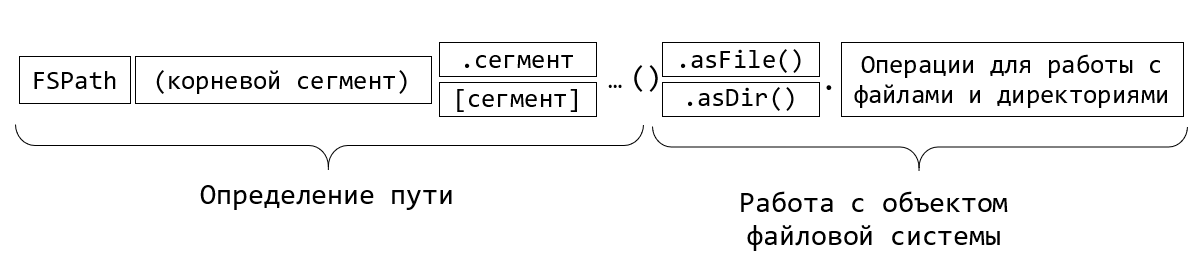
FSTB – FileSystem ToolBox.
FSTB:
npm i fstb
:
const fstb = require('fstb');
FSPath
, : cwd
, dirname
, home
tmp
( ). envPath
.
:
fstb.cwd["README.md"]().asFile().read.txt().then(txt=>console.log(txt));
FSTB , async/await:
(async function() {
const package_json = await fstb.cwd["package.json"]().asFile().read.json();
console.log(package_json);
})();
json . , , , .
, - :
const fs = require("fs/promises");
const path = require("path");
(async function() {
const package_json_path = path.join(process.cwd(), "package.json");
const file_content = await fs.readFile(package_json_path, "utf8");
const result = JSON.parse(file_content);
console.log(result);
})();
, , , .
const fs = require('fs');
const readline = require('readline');
async function processLineByLine() {
const fileStream = fs.createReadStream('input.txt');
const rl = readline.createInterface({
input: fileStream,
crlfDelay: Infinity
});
// Note: we use the crlfDelay option to recognize all instances of CR LF
// ('\r\n') in input.txt as a single line break.
for await (const line of rl) {
// Each line in input.txt will be successively available here as `line`.
console.log(`Line from file: ${line}`);
}
}
processLineByLine();
FSTB:
(async function() {
await fstb.cwd['package.json']()
.asFile()
.read.lineByLine()
.forEach(line => console.log(`Line from file: ${line}`));
})();
, . , . , , filter
, map
, reduce
.. , , , csv, .map(line => line.split(','))
.
, . . :
(async function() {
const string_to_write = ' !';
await fstb.cwd['habr.txt']()
.asFile()
.write.txt(string_to_write);
})();
:
await fstb.cwd['habr.txt']()
.asFile()
.write.appendFile(string_to_write, {encoding:"utf8"});
json:
(async function() {
const object_to_write = { header: ' !', question: ' ', answer: 42 };
await fstb.cwd['habr.txt']()
.asFile()
.write.json(object_to_write);
})();
:
(async function() {
const file = fstb.cwd['million_of_randoms.txt']().asFile();
//
const stream = file.write.createWriteStream();
stream.on('open', () => {
for (let index = 0; index < 1_000_000; index++) {
stream.write(Math.random() + '\n');
}
stream.end();
});
await stream;
//
const lines = await file.read.lineByLine().reduce(acc => ++acc, 0);
console.log(`${lines} lines count`);
})();
, ? :
await stream; // <= WTF?!!
, WriteStream
, . , , , await
. , await
.
, , . FSTB? , fs.
:
const stat = await file.stat()
console.log(stat);
:
Stats {
dev: 1243191443,
mode: 33206,
nlink: 1,
uid: 0,
gid: 0,
rdev: 0,
blksize: 4096,
ino: 26740122787869450,
size: 19269750,
blocks: 37640,
atimeMs: 1618579566188.5884,
mtimeMs: 1618579566033.8242,
ctimeMs: 1618579566033.8242,
birthtimeMs: 1618579561341.9297,
atime: 2021-04-16T13:26:06.189Z,
mtime: 2021-04-16T13:26:06.034Z,
ctime: 2021-04-16T13:26:06.034Z,
birthtime: 2021-04-16T13:26:01.342Z
}
-:
const fileHash = await file.hash.md5();
console.log("File md5 hash:", fileHash);
// File md5 hash: 5a0a221c0d24154b850635606e9a5da3
:
const renamedFile = await file.rename(`${fileHash}.txt`);
:
// ,
// "temp"
const targetDir = renamedFile.fsdir.fspath.temp().asDir()
if(!(await targetDir.isExists())) await targetDir.mkdir()
//
const fileCopy = await renamedFile.copyTo(targetDir)
const fileCopyHash = await fileCopy.hash.md5();
console.log("File copy md5 hash:", fileCopyHash);
// File md5 hash: 5a0a221c0d24154b850635606e9a5da3
:
await renamedFile.unlink();
, , :
console.log({
isExists: await file.isExists(),
isReadable: await file.isReadable(),
isWritable: await file.isWritable() });
, , , .
:
, – . , . , FSTB . FSDir
, :
// FSDir node_modules:
const node_modules = fstb.cwd.node_modules().asDir();
? -, :
//
await node_modules.subdirs().forEach(async dir => console.log(dir.name));
filter, map, reduce, forEach, toArray. , , «@» .
const ileSizes = await node_modules
.subdirs()
.filter(async dir => dir.name.startsWith('@'))
.map(async dir => ({ name: dir.name, size: await dir.totalSize() })).toArray();
fileSizes.sort((a,b)=>b.size-a.size);
console.table(fileSizes);
- :
┌─────────┬──────────────────────┬─────────┐
│ (index) │ name │ size │
├─────────┼──────────────────────┼─────────┤
│ 0 │ '@babel' │ 6616759 │
│ 1 │ '@typescript-eslint' │ 2546010 │
│ 2 │ '@jest' │ 1299423 │
│ 3 │ '@types' │ 1289380 │
│ 4 │ '@webassemblyjs' │ 710238 │
│ 5 │ '@nodelib' │ 512000 │
│ 6 │ '@rollup' │ 496226 │
│ 7 │ '@bcoe' │ 276877 │
│ 8 │ '@xtuc' │ 198883 │
│ 9 │ '@istanbuljs' │ 70704 │
│ 10 │ '@sinonjs' │ 37264 │
│ 11 │ '@cnakazawa' │ 25057 │
│ 12 │ '@size-limit' │ 14831 │
│ 13 │ '@polka' │ 6953 │
└─────────┴──────────────────────┴─────────┘
, , ))
. , typescript . , :
const ts_versions = await node_modules
.subdirs()
.map(async dir => ({
dir,
package_json: dir.fspath['package.json']().asFile(),
}))
// package.json
.filter(async ({ package_json }) => await package_json.isExists())
// package.json
.map(async ({ dir, package_json }) => ({
dir,
content: await package_json.read.json(),
}))
// devDependencies.typescript package.json
.filter(async ({ content }) => content.devDependencies?.typescript)
// typescript
.map(async ({ dir, content }) => ({
name: dir.name,
ts_version: content.devDependencies.typescript,
}))
.toArray();
console.table(ts_versions);
:
┌─────────┬─────────────────────────────┬───────────────────────┐
│ (index) │ name │ ts_version │
├─────────┼─────────────────────────────┼───────────────────────┤
│ 0 │ 'ajv' │ '^3.9.5' │
│ 1 │ 'ast-types' │ '3.9.7' │
│ 2 │ 'axe-core' │ '^3.5.3' │
│ 3 │ 'bs-logger' │ '3.x' │
│ 4 │ 'chalk' │ '^2.5.3' │
│ 5 │ 'chrome-trace-event' │ '^2.8.1' │
│ 6 │ 'commander' │ '^3.6.3' │
│ 7 │ 'constantinople' │ '^2.7.1' │
│ 8 │ 'css-what' │ '^4.0.2' │
│ 9 │ 'deepmerge' │ '=2.2.2' │
│ 10 │ 'enquirer' │ '^3.1.6' │
...
?
. fspath:
// FSDir node_modules:
const node_modules = fstb.cwd.node_modules().asDir();
// "package.json" "fstb"
const package_json = node_modules.fspath.fstb["package.json"]().asFile()
, temp . FSTB mkdtemp
.
mkdir
. copyTo
moveTo
. - rmdir
( ) rimraf
( ).
:
//
const temp_dir = await fstb.mkdtemp("fstb-");
if(await temp_dir.isExists()) console.log(" ")
// : src, target1 target2
const src = await temp_dir.fspath.src().asDir().mkdir();
const target1 = await temp_dir.fspath.target1().asDir().mkdir();
const target2 = await temp_dir.fspath.target2().asDir().mkdir();
// src :
const test_txt = src.fspath["test.txt"]().asFile();
await test_txt.write.txt(", !");
// src target1
const src_copied = await src.copyTo(target1);
// src target2
const src_movied = await src.moveTo(target2);
//
// subdirs(true) –
await temp_dir.subdirs(true).forEach(async dir=>{
await dir.files().forEach(async file=>console.log(file.path))
})
// ,
console.log(await src_copied.fspath["test.txt"]().asFile().read.txt())
console.log(await src_movied.fspath["test.txt"]().asFile().read.txt())
//
await temp_dir.rimraf()
if(!(await temp_dir.isExists())) console.log(" ")
:
C:\Users\debgger\AppData\Local\Temp\fstb-KHT0zv\target1\src\test.txt C:\Users\debgger\AppData\Local\Temp\fstb-KHT0zv\target2\src\test.txt , ! , !
, , . , join’ , .
, Node.js. , . FSTB . , , , , .
, FSTB, :
.
, IDE .
,
Node.js 10- ,
, , , FSPath, , , . .
, , . , . , , .
GitHub: https://github.com/debagger/fstb
: https://debagger.github.io/fstb/
Terima kasih atas perhatian Anda!