
Saya selalu tertarik dengan pemrograman tingkat rendah - untuk berkomunikasi secara langsung dengan peralatan, menyulap register, memahami secara rinci cara kerja ... Sayangnya, sistem operasi modern mengisolasi perangkat keras dari pengguna sebanyak mungkin, dan Anda tidak dapat menulis sesuatu ke memori fisik atau register perangkat. Lebih tepatnya, saya pikir begitu, tetapi ternyata hampir setiap produsen perangkat keras melakukan ini!
Apa gunanya kapten?
Dalam arsitektur x86 ada konsep "cincin" - mode operasi prosesor. Semakin rendah nomor mode saat ini, semakin banyak kemungkinan yang tersedia untuk kode yang dapat dieksekusi. "Dering" yang paling terbatas adalah "Dering 3", yang paling diistimewakan adalah "Dering -2" (mode SMM). Secara historis, semua program pengguna berjalan dalam mode Ring 3, dan kernel OS berjalan di Ring 0:
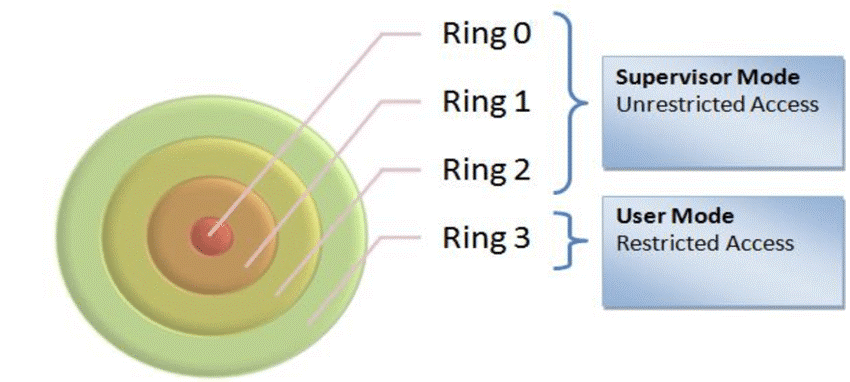
Dalam "Ring 3" program dilarang dari tindakan yang berpotensi berbahaya seperti mengakses port I / O dan memori fisik. Dengan logika pengembang, akses tingkat rendah seperti itu tidak diperlukan untuk program biasa. Hanya sistem operasi dan komponennya (layanan dan driver) yang memiliki akses ke fitur ini. Dan semua akan baik-baik saja, tetapi suatu hari saya menemukan program RW Everything:
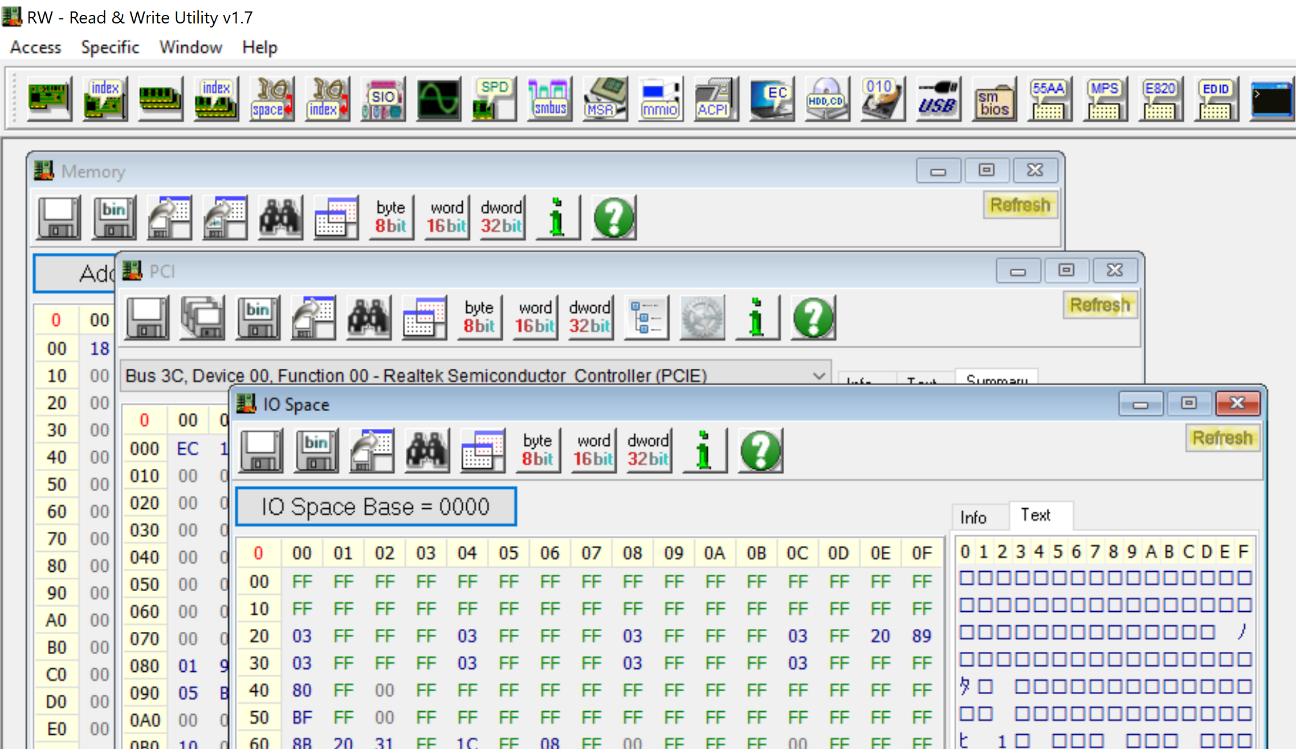
, «Ring 3» - , I/O , PCI ( ). , , . , RW Everything -:
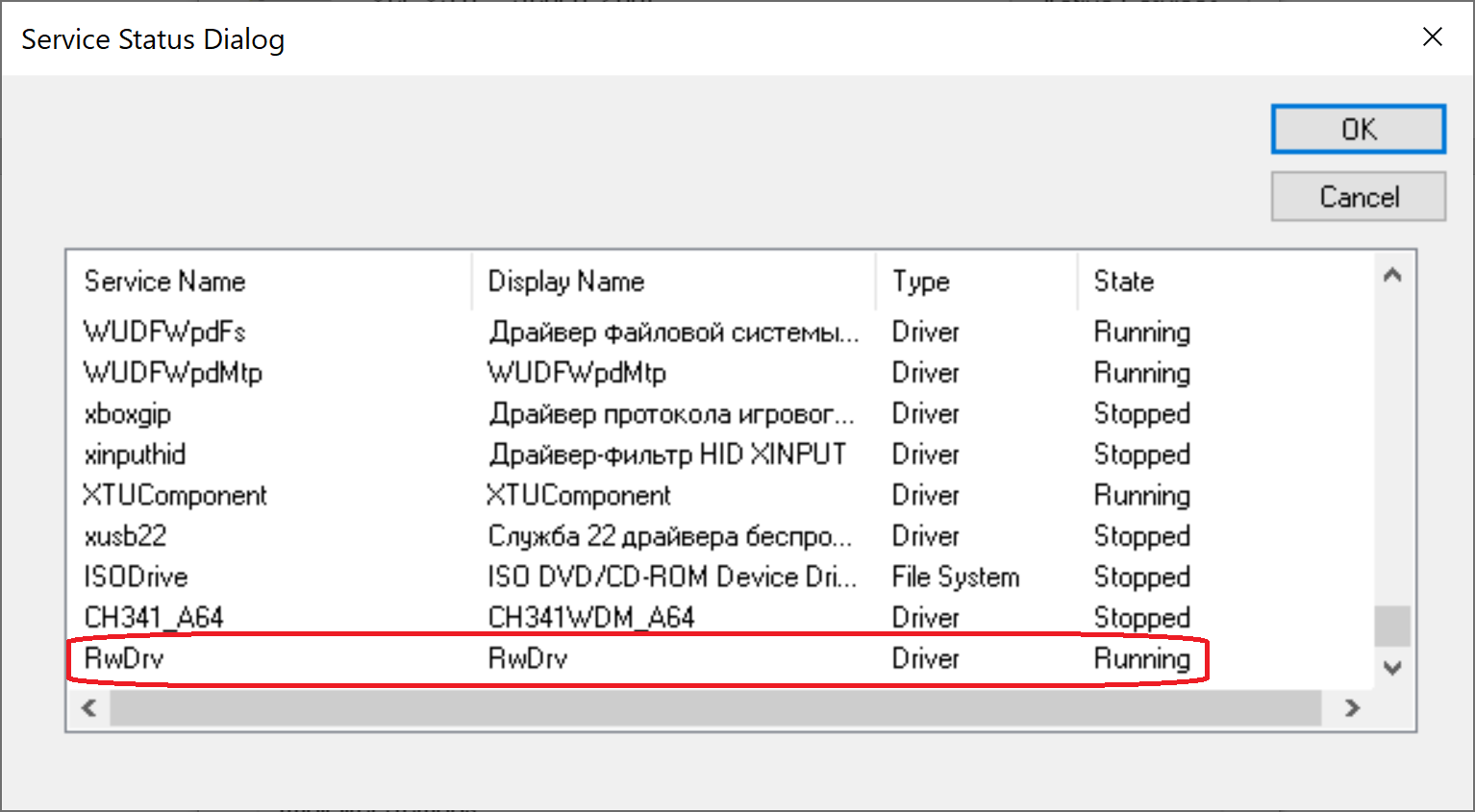
-
– , , , , ! – , RW Everything , . , . , :
BIOS (Asrock, Gigabyte, HP, Dell, AMI, Intel, Insyde…)
(AMD, Intel, ASUS, ASRock, Gigabyte)
(CPU-Z, GPU-Z, AIDA64)
PCI (Nvidia, Asmedia)
– «- », – . - :
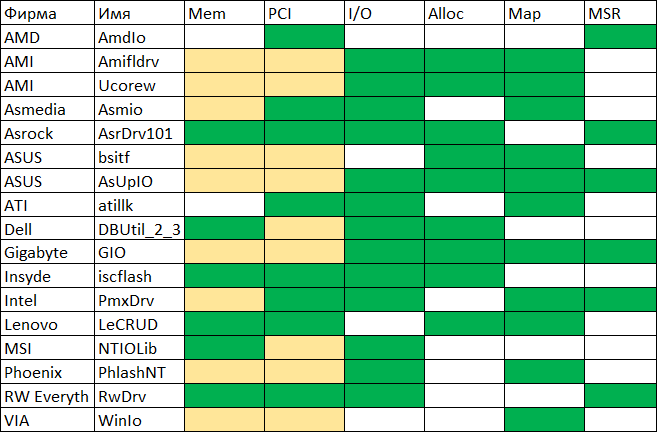
:
Mem – /
PCI – / PCI Configuration Space
I/O – / I/O
Alloc –
Map –
MSR – / x86 MSR (Model Specific Register)
, , ( ). – AsrDrv101 ASRock. , (!!)
AsrDrv101
/ RAM
/ IO
/ PCI Configuration Space
/ MSR (Model-Specific Register)
/ CR (Control Register)
TSC (Time Stamp Counter)
PMC (Performance Monitoring Counter)
CPUID
Alloc / Free
Python
"" . Python, , .
. " " ( !) System32:
#puts the driver into Windows/System32/drivers folder
def SaveDriverFile(self):
  winPath = os.environ['WINDIR']
  sys32Path = os.path.join(winPath, "System32")
  targetPath = os.path.join(sys32Path, "drivers\\" + self.name + ".sys")
  file_data = open(self.file_path, "rb").read()
  open(targetPath, "wb").write(file_data)
%WINDIR%\Sysnative, - , Python 32-. ( , 64- 32- System32 SysWOW64, System32, Sysnative).
:
#registers the driver for further startup
def RegisterDriver(self):
  serviceManager = win32service.OpenSCManager(None, None,
                                              win32service.SC_MANAGER_ALL_ACCESS)
  driverPath = os.path.join(os.environ['WINDIR'], 'system32\\drivers\\' +
                            self.name + '.sys')
  serviceHandle = win32service.CreateService(serviceManager,self.name,self.name,
                                             win32service.SERVICE_ALL_ACCESS,
                                             win32service.SERVICE_KERNEL_DRIVER,
                                             win32service.SERVICE_DEMAND_START,
                                             win32service.SERVICE_ERROR_NORMAL,
                                             driverPath, None,0,None,None,None)
  win32service.CloseServiceHandle(serviceManager)
  win32service.CloseServiceHandle(serviceHandle)

#starts the driver
def RunDriver(self):
  win32serviceutil.StartService(self.name)
(, "" ), :
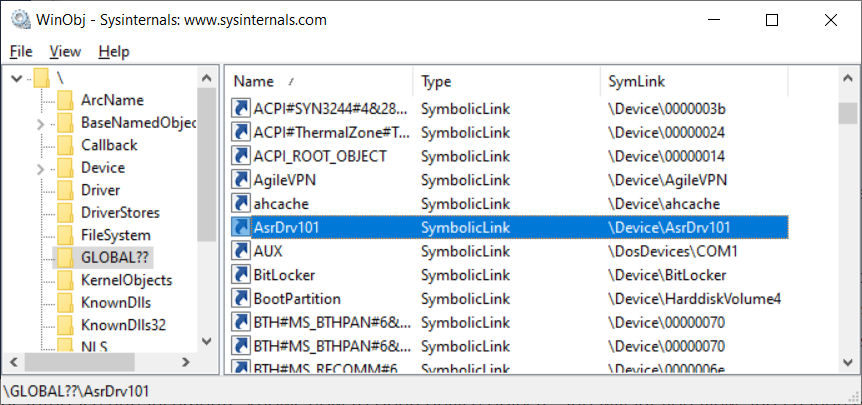
, IoCtl:
#tries to open the driver by name
def OpenDriver(self):
    handle = win32file.CreateFile("\\\\.\\" + self.name,
                                  win32file.FILE_SHARE_READ |
                                  win32file.FILE_SHARE_WRITE,
                                  0, None, win32file.OPEN_EXISTING,
                                  win32file.FILE_ATTRIBUTE_NORMAL |
                                  win32file.FILE_FLAG_OVERLAPPED,
                                  None)
    if handle == win32file.INVALID_HANDLE_VALUE:
          return None
    return handle

#performs IOCTL!
def IoCtl(self, ioctlCode, inData, outLen=0x1100):
    out_buf = win32file.DeviceIoControl(self.dh,ioctlCode,inData,outLen,None)
    return out_buf
. , , "" . , , - "". ( ). - , "Pending Stop". - .
"", . , , . , . , , ! , - :
#perform IOCTL!
def IoCtl(self, ioctlCode, inData, outLen=0x1100):
  #open driver file link
  driverHandle = self.OpenDriver()
  if driverHandle is None:
    self.ReinstallDriver()
    driverHandle = self.OpenDriver()
    #second try
    if driverHandle is None:
      return None
  #perform IOCTL
  out_buf = win32file.DeviceIoControl(driverHandle,ioctlCode,inData,outLen,None)
  #close driver file link
  win32file.CloseHandle(driverHandle)
  return out_buf
:
class PmxInterface:
  def __init__(self):
    self.d = PmxDriver("AsrDrv101")

    def MemRead(self, address, size, access=U8):
      buf = ctypes.c_buffer(size)
      request = struct.pack("<QIIQ", address, size, access,
                            ctypes.addressof(buf))
      if self.d.IoCtl(0x222808, request, len(request)):
        return bytearray(buf)
      else:
        return None

      def MemWrite(self, address, data, access=U8):
        buf = ctypes.c_buffer(data, len(data))
        request = struct.pack("<QIIQ", address, len(data), access,
                              ctypes.addressof(buf))
        return self.d.IoCtl(0x22280C, request, len(request)) is not None
      # (   )
:
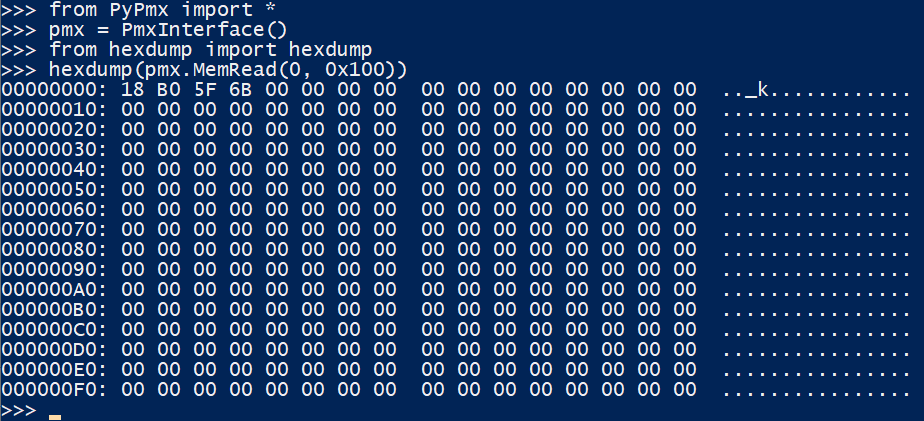
PCI Express Config Space
PCIE Config Space. - PCI I/O 0xCF8 / 0xCFC. AsrDrv101:
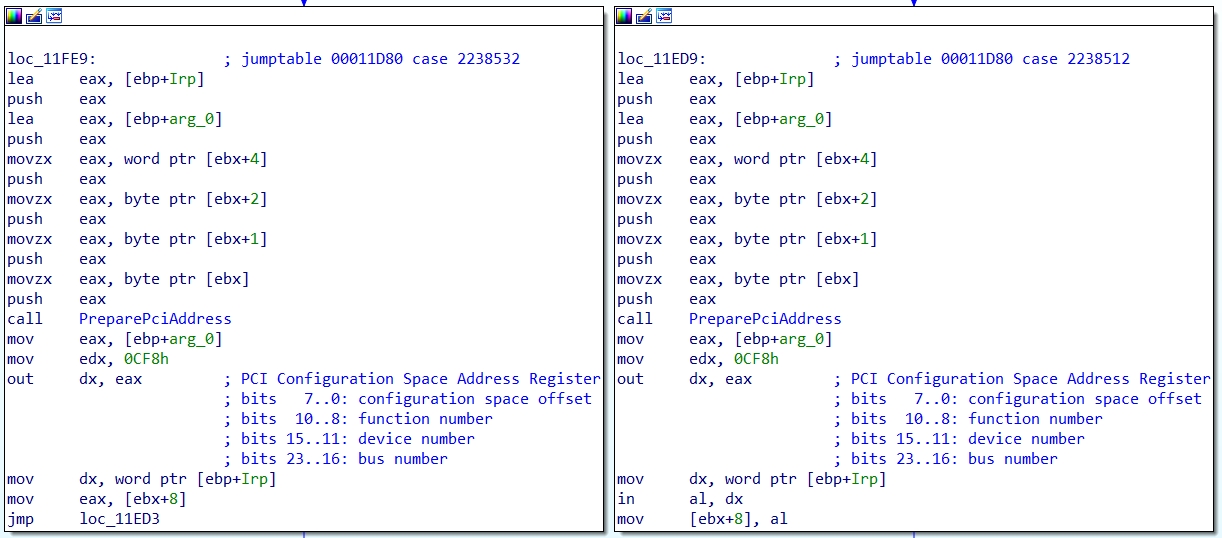
0x100 , PCI Express Config Space 0x1000 ! PCI Extended Config Space, - , BIOS:
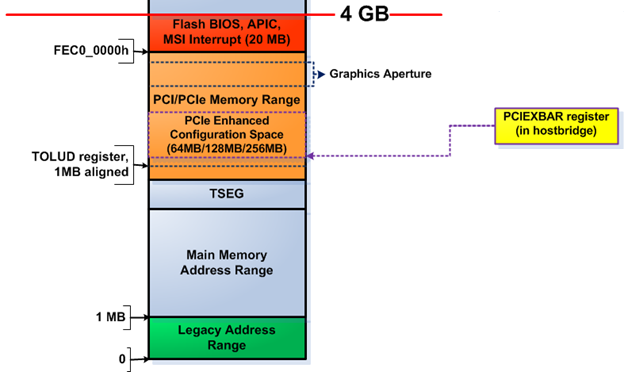
Intel (, ) PCI 0:0:0 0x60, :

AMD ( , ), . , , ACPI MCFG
ACPI RSDP, 0xE0000-0xFFFFF, RSDT. , . :
rsdp = self.PhysSearch(0xE0000, 0x20000, b"RSD PTR ", step=0x10)
#use rsdt only for simplicity
rsdt = self.MemRead32(rsdp + 0x10)
(rsdtSign, rsdtLen) = struct.unpack("<II", self.MemRead(rsdt, 8, U32))
if rsdtSign == 0x54445352: #RSDT
  headerSize = 0x24
  rsdtData = self.MemRead(rsdt + headerSize, rsdtLen - headerSize, U32)
  #iterate through all ACPI tables
  for i in range(len(rsdtData) // 4):
    pa = struct.unpack("<I", rsdtData[i*4:(i+1)*4])[0]
    table = self.MemRead(pa, 0x40, U32)
    if table[0:4] == b"MCFG":
      #we have found the right table, parse it
      (self.pciMmAddress, pciSeg, botBus, self.pciMmTopBus) =
      	struct.unpack("<QHBB", table[0x2C:0x38])
Intel
if self.PciRead16(PciAddress(0,0,0,0)) == 0x8086:
  #try intel way
  pciexbar = self.PciRead64(PciAddress(0,0,0,0x60))
  if pciexbar & 1:
    self.pciMmTopBus = (1 << (8 - ((pciexbar >> 1) & 3))) - 1
    self.pciMmAddress = pciexbar & 0xFFFF0000
, PCI Express Config Space . - !
BIOS
"", BIOS. "" - 32- , 0xFFFFFFF0. - 4-16 , "" 0xFF000000, - , , BIOS:
from PyPmx import PmxInterface
pmx = PmxInterface()

for i in range(0xFF000000, 0x100000000, 0x10000):
  data = pmx.MemRead(i, 0x20)
  if data != b"\xFF"*0x20 and data != b"\x00"*0x20:
    biosLen = 0x100000000-i
    print("BIOS Found at 0x%x" % i)
    f = open("dump.bin", "wb")
    for j in range(0, biosLen, 0x1000):
      data = pmx.MemRead(i + j, 0x1000)
      f.write(data)
      break
:

-, 6 , 4 8 - . , Intel BIOS, . , SPI .
, , , SPI PCI Express:
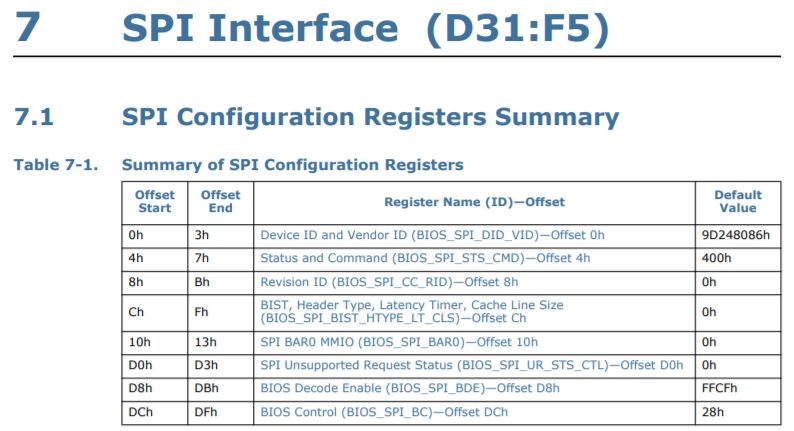
, BAR0 MMIO :
BIOS_FADDR
BIOS_HSFTS_CTL
BIOS_FDATA
:
from PyPmx import PmxInterface, PciAddress, U32

spi = PciAddress(0, 31, 5)
pmx = PmxInterface()
spiMmio = pmx.PciRead32(spi + 0x10) & 0xFFFFF000
f = open("dump.bin", "wb")

for i in range(0, 0x800000, 0x40):
  # write BIOS_FADDR
  pmx.MemWrite32(spiMmio + 0x08, i)
  # write BIOS_HSFTS_CTL
  #        read      0x40 bytes      start     clear fcerr & fgo
  cmd = (0 << 17) | (0x3F << 24) | (1 << 16) |         3
  pmx.MemWrite32(spiMmio + 0x04, cmd)
  # wait for read or error
  curCmd = pmx.MemRead32(spiMmio + 0x04)
  while curCmd & 3 == 0:
    curCmd = pmx.MemRead32(spiMmio + 0x04)
  # read BIOS_FDATA
  data = pmx.MemRead(spiMmio + 0x10, 0x40, U32)
  f.write(data)
- 20 8 BIOS! ( - , ME ).
, - USB , ATA , . - :
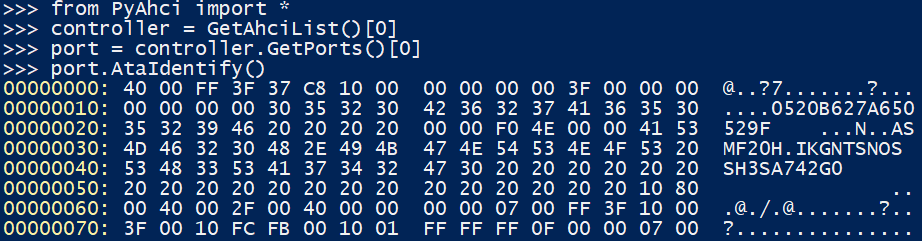
?
- , , ? . , Open-Source chipsec, .
, :
WARNING
!!!!!!!!!!!!!!!!!!!!!!!!!!!!!!!!!!!!!!!!!!!!!!!!!!!!!!!!!!!!!!!!!!!!!!!!
!!
!! Chipsec should only be run on test systems!
!! It should not be installed/deployed on end-user systems!
!!
!! There are multiple reasons for that:
!!
!! 1. Chipsec kernel drivers provide raw access to HW resources to
!! user-mode applications (like access to physical memory). This would
!! allow malware to compromise the OS kernel.
!! 2. The driver is distributed as a source code. In order to load it
!! on OS which requires signed drivers (e.g. x64 Microsoft Windows 7
!! and higher), you'll need to enable TestSigning mode and self-sign
!! the driver binary. Enabling TestSigning (or equivalent) mode also
!! turns off important protection of OS kernel.
!!
!! 3. Due to the nature of access to HW resources, if any chipsec module
!! issues incorrect access to these HW resources, OS can crash/hang.
!!
!! If, for any reason, you want to production sign chipsec driver and
!! deploy chipsec on end-user systems,
!! DON'T!
!!
!!!!!!!!!!!!!!!!!!!!!!!!!!!!!!!!!!!!!!!!!!!!!!!!!!!!!!!!!!!!!!!!!!!!!!!!
, - , Windows Test Mode, . , . ASRock.
- Microsoft. , .
Windows DDK, 64-
vfd.sys, critical0, dartraiden «- ». ,vfdwin
, :
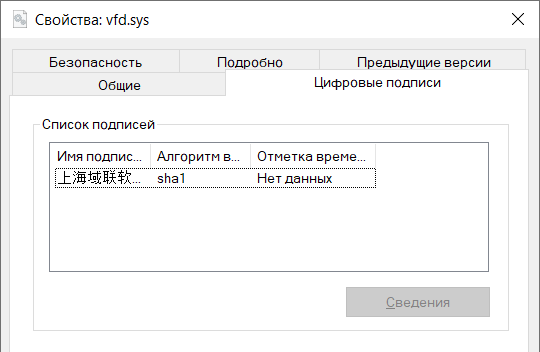
-
- SignTool , GitHub. , GitHub TrustAsia, .
- , ( ):
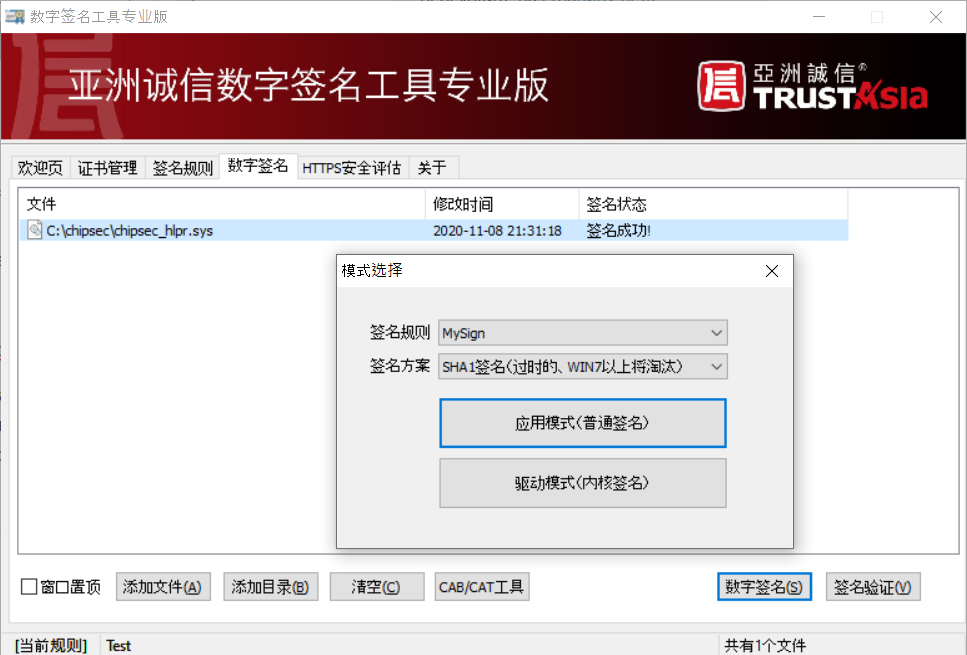
, AsrDrv101, !
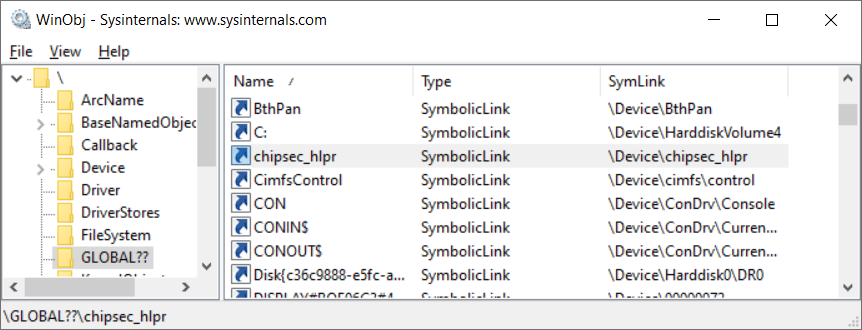
, . . , TODO.
?
Seperti yang Anda lihat, dengan memiliki hak administrator, Anda dapat melakukan hampir semua hal dengan komputer Anda. Hati-hati - menginstal utilitas dari pabrikan perangkat keras Anda dapat menyebabkan lubang pada sistem. Nah, mereka yang ingin bereksperimen dengan PC mereka - selamat datang di level rendah! Saya memposting pekerjaan di GitHub . Hati-hati, penggunaan yang sembrono penuh dengan BSOD.