Karakteristik apa yang harus dimiliki aplikasi web untuk memenuhi kriteria "progresif"? Jelas bahwa, seperti aplikasi web biasa, aplikasi progresif dibangun atas dasar teknologi web "tiga besar" - HTML / CSS / JS. Tapi apa sebenarnya yang membuat aplikasi web menjadi progresif?
Dalam publikasi ini saya akan mencoba menemukan sekumpulan karakteristik minimum yang harus dipenuhi oleh aplikasi web saat ini untuk disebut "progresif", dan juga menjawab pertanyaan mengapa pada bulan Agustus tahun ini beberapa aplikasi "progresif" akan berhenti seperti itu.
Prinsip pemilihan karakteristik
Saya akan mengambil file HTML kosong dan secara bertahap menambahkan artefak ke file tersebut yang mengubahnya menjadi PWA hingga ponsel cerdas saya memutuskan untuk menginstal aplikasi ini dan Chrome berhenti memberikan peringatan. Chrome dipilih karena Google saat ini menjadi penggerak utama teknologi PWA.
HTTPS
Hal pertama yang harus dikonfigurasi di server adalah enkripsi lalu lintas. Semuanya dilakukan di sini dengan cara yang sama seperti untuk aplikasi web konvensional. Secara pribadi, saya menggunakan Apache httpd , dan saya menghasilkan sertifikat enkripsi melalui Let's Encrypt .
App Shell
Shell aplikasi adalah kumpulan file minimum yang memungkinkan aplikasi berjalan offline. Saya akan mencoba untuk menyesuaikan semua kode yang diperlukan (HTML / CSS / JS) secara maksimal dalam satu file - index.html
.
<!DOCTYPE html>
<html lang="en">
<head>
<title>PWA</title>
<style>
BODY {
background-color: #FB9902;
color: #342309;
font-size: xx-large;
margin: 0;
}
DIV {
align-content: center;
display: grid;
height: 100vh;
justify-content: center;
}
</style>
</head>
<body>
<div>App Shell</div>
</body>
</html>
Nyata
Manifes adalah penanda langsung bahwa halaman tersebut adalah bagian dari aplikasi web progresif. Manifes disertakan di header halaman HTML:
<link rel="manifest" href="demo.pwa.json">
Chrome:

, Chrome :
{
"start_url": "./",
"name": "PWA",
"display": "standalone",
"icons": [
{
"src": "./icon.png",
"sizes": "144x144",
"type": "image/png"
}
]
}
Icon
Chrome', 144x144 PNG, SVG WebP. :

Service Worker
Chrome - service worker'.
Service worker (index.html
):
<script>
if ("serviceWorker" in navigator) {
self.addEventListener("load", async () => {
const container = navigator.serviceWorker;
if (container.controller === null) {
const reg = await container.register("sw.js");
}
});
}
</script>
sw.js
:
'use strict';
Chrome: Page does not work offline
'use strict';
function hndlEventFetch(evt) {}
self.addEventListener('fetch', hndlEventFetch);
:
Site cannot be installed: Page does not work offline. Starting in Chrome 93, the installability criteria is changing, and this site will not be installable. See https://goo.gle/improved-pwa-offline-detection for more information.
Chrome: Version 89.0.4389.72 (Official Build) (64-bit)
, :
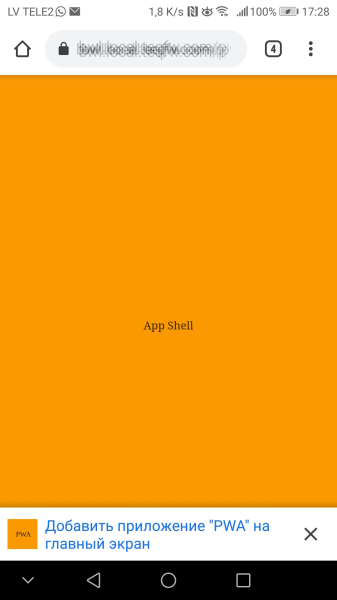
, service worker , ( 2021-) .
PWA 2021-, , . service worker':
'use strict';
const CACHE_STATIC = 'static-cache-v1';
function hndlEventInstall(evt) {
/**
* @returns {Promise<void>}
*/
async function cacheStaticFiles() {
const files = [
'./',
'./demo.pwa.json',
'./icon.png',
'./index.html',
'./sw.js',
];
const cacheStat = await caches.open(CACHE_STATIC);
await Promise.all(
files.map(function (url) {
return cacheStat.add(url).catch(function (reason) {
console.log(`'${url}' failed: ${String(reason)}`);
});
})
);
}
// wait until all static files will be cached
evt.waitUntil(cacheStaticFiles());
}
function hndlEventFetch(evt) {
async function getFromCache() {
const cache = await self.caches.open(CACHE_STATIC);
const cachedResponse = await cache.match(evt.request);
if (cachedResponse) {
return cachedResponse;
}
// wait until resource will be fetched from server and stored in cache
const resp = await fetch(evt.request);
await cache.put(evt.request, resp.clone());
return resp;
}
evt.respondWith(getFromCache());
}
self.addEventListener('install', hndlEventInstall);
self.addEventListener('fetch', hndlEventFetch);
service worker' Chrome 93+. :
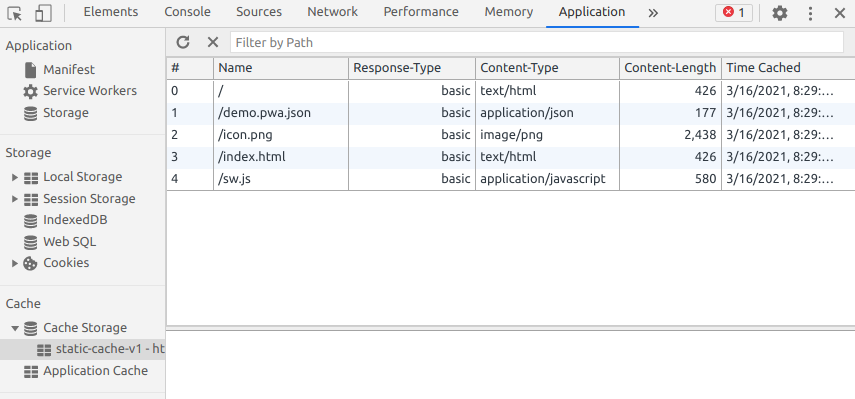
, - favicon.ico
:
GET https://bwl.local.teqfw.com/favicon.ico 404
, PWA.
web- ( 2021-) :
(HTTPS).
( ).
( service worker).
.
Service worker.
.
PWA :
Chrome , 93 web- . PWA , Vue Storefront. Magento 2 , ( , Magento 2 web-).
, Vue Storefront, , , . , e- . , PWA , PWA . -, - - web, - -. web-, serverless ( App Shell, service worker', - ). , web- -, - .
Vue Storefront , . Vue Storefront , Chrome 93+ (, ). , PWA- Magento .
Google PWA, web' . , web- , 100% -. , PWA - :
In December 2020, Firefox for desktop abandoned implementation of PWAs (specifically, removed the prototype "site-specific browser" configuration that had been available as an experimental feature). A Firefox architect noted: "The signal I hope we are sending is that PWA support is not coming to desktop Firefox anytime soon." Mozilla still plans to support PWAs on Android.

- PWA- . "" .
Menurut pendapat saya, PWA adalah solusi "khusus" untuk perangkat seluler. Ya, ini dibuat menggunakan teknologi web (HTML / CSS / JS) dan berjalan di dalam browser, tetapi pengembangan PWA harus didekati dari sudut pandang aplikasi seluler asli daripada dari sudut pandang aplikasi web (situs atau SPA ).
Dengan kata lain, jika Anda hanya membutuhkan aplikasi web, maka Anda tidak memerlukan PWA. Tetapi jika Anda perlu mengembangkan aplikasi seluler, PWA mungkin merupakan opsi yang dapat diterima.