Ada beberapa plot matplotlib. Anda perlu menyimpannya ke dalam satu file pdf. Apa yang harus dilakukan?
Metode I. Menyimpan satu grafik pada satu halaman menggunakan PdfPages
Metode ini dapat diterapkan dengan dua opsi.
Menggunakan sihir matplotlib:
from matplotlib.backends.backend_pdf import PdfPages
import matplotlib.pyplot as plt
import numpy as np
# .
pdf = PdfPages("Figures.pdf")
# .
FUNCTIONS = [np.sin, np.cos, np.sqrt, lambda x: x**2]
X = np.linspace(-5, 5, 100)
for function in FUNCTIONS:
plt.plot(X, function(X))
pdf.savefig()
plt.close()
#
pdf.close()
Menggunakan akses langsung ke bentuk:
from matplotlib.backends.backend_pdf import PdfPages
import matplotlib.pyplot as plt
import numpy as np
# .
FUNCTIONS = [np.sin, np.cos, np.sqrt, lambda x: x**2]
X = np.linspace(-5, 5, 100)
figures = []
for function in FUNCTIONS:
figure = plt.figure()
axes = figure.subplots()
axes.plot(X, function(X))
figures.append(figure)
# .
# figures = []
# .
pdf = PdfPages("Figures.pdf")
for figure in figures:
pdf.savefig(figure)
#
pdf.close()
Kita mendapatkan:
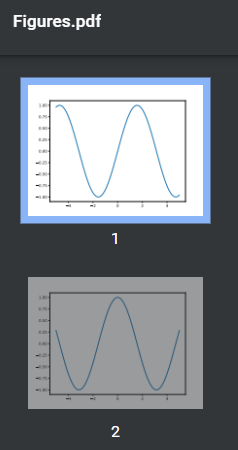
Metode II. Menyimpan banyak grafik dalam satu halaman menggunakan PdfPages
from matplotlib.backends.backend_pdf import PdfPages
import matplotlib.pyplot as plt
import numpy as np
#
FUNCTIONS = [np.sin, np.cos, np.sqrt, lambda x: x**2, np.tan]
X = np.linspace(-5, 5, 100)
#
ROWS = 2
COLUMNS = 2
# .
pdf = PdfPages("Figures.pdf")
#
index = 0
for page in range(len(FUNCTIONS)//(ROWS*COLUMNS)+1):
# .
figure = plt.figure(figsize=(12, 12))
axes = figure.subplots(ROWS, COLUMNS)
#
for row in range(ROWS):
for column in range(COLUMNS):
if index < len(FUNCTIONS):
axes[row, column].plot(X, FUNCTIONS[index](X))
index += 1
#
pdf.savefig(figure)
#
pdf.close()
Kita mendapatkan:
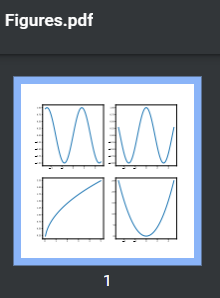
Ini tidak akan berfungsi jika kita memiliki larik bentuk beton yang sudah ada. Untuk alasan sederhana ini, gambar telah ditarik apa yang dibutuhkan, dan sebagaimana mestinya. Dan selain itu, setiap bentuk memiliki dpi dan ukurannya sendiri-sendiri, yang memengaruhi rendering. Tentu saja, semua ini dapat diperhitungkan dengan memperumit algoritme, tetapi jauh lebih mudah untuk menggunakan metode 3.
Metode III. Menggunakan reportlab
Cara paling serbaguna.
import matplotlib.pyplot as plt
import numpy as np
from io import BytesIO
from reportlab.pdfgen import canvas
from reportlab.lib.units import cm
from reportlab.lib.utils import ImageReader
# .
FUNCTIONS = [np.sin, np.cos, np.sqrt, lambda x: x**2]
X = np.linspace(-5, 5, 100)
figures = []
for function in FUNCTIONS:
figure = plt.figure()
axes = figure.subplots()
axes.plot(X, function(X))
figures.append(figure)
# .
# figures = []
#
indent = 1.5
# canvas
c = canvas.Canvas("Figures.pdf")
c.setTitle("Figures")
height = indent
# .
for figure in figures:
# dpi ( )
dpi = figure.get_dpi()
figureSize = figure.get_size_inches()
# .
# , .
figure.patches.extend(
[plt.Rectangle((0, 1/(dpi*figureSize[1])), width=1-2/(dpi*figureSize[0]),
height=1-2/(dpi*figureSize[1]),
transform=figure.transFigure, figure=figure, clip_on=False,
edgecolor="black",
facecolor="none", linewidth=1)])
# .
image = BytesIO()
figure.savefig(image, format="png")
image.seek(0)
image = ImageReader(image)
# .
figureSize = figure.get_size_inches()*2.54
# A4 210×297
# ,
if height + figureSize[1] + indent > 29.7:
height = indent
c.showPage()
# image pdf
c.drawImage(image, (10.5-figureSize[0]/2)*cm, height*cm,
figureSize[0]*cm, figureSize[1]*cm)
height += figureSize[1]
# .
c.save()
Kita mendapatkan:
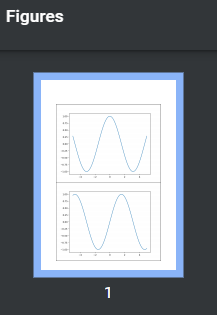
Terima kasih telah membaca artikelnya. Semoga berhasil!