Halo, seperti yang dijanjikan, dalam kelanjutan artikel saya tentang menerbitkan aplikasi secara otomatis di Google Play , saya akan mempertimbangkan secara detail proses penulisan Telegram Bot untuk memberi tahu tim penguji tentang rilis versi baru.
Mendaftarkan Bota di Telegram dan mendapatkan ID
Cukup email pengguna @BotFather dan ikuti instruksi mereka.
Jalankan perintah berikut secara berurutan
/start
/newbot
bot_name
Akibatnya, Anda akan menerima pesan tersebut

Dari pesan inilah sebenarnya kita membutuhkan
t.me/bot_name - Nama bot yang akan kita gunakan untuk menambahkannya ke saluran atau menulis ke LAN
token adalah kunci API kami
Mempersiapkan proyek dan menghubungkan perpustakaan yang diperlukan
Bot kami akan ditulis di Java dan akan menjadi aplikasi Web Spring Boot, maven akan digunakan sebagai sistem build
1) Buat proyek Spring Boot biasa, cara termudah untuk melakukannya adalah melalui konfigurator bawaan di IntelliJ IDEA , atau menggunakan Spring Initializr .
Pilih dependensi yang menurut Anda perlu, tetapi sebagai permulaan, set minimum cocok untuk kita
pom.xml
<parent>
<groupId>org.springframework.boot</groupId>
<artifactId>spring-boot-starter-parent</artifactId>
<version>2.1.6.RELEASE</version>
<relativePath/> <!-- lookup parent from repository -->
</parent>
<properties>
<java.version>1.8</java.version>
</properties>
<dependencies>
<dependency>
<groupId>org.springframework.boot</groupId>
<artifactId>spring-boot-starter-web</artifactId>
</dependency>
<dependency>
<groupId>org.springframework.boot</groupId>
<artifactId>spring-boot-starter-test</artifactId>
<scope>test</scope>
</dependency>
<dependency>
<groupId>org.telegram</groupId>
<artifactId>telegrambots</artifactId>
<version>5.0.0</version>
</dependency>
<dependency>
<groupId>com.google.code.gson</groupId>
<artifactId>gson</artifactId>
<version>2.8.6</version>
</dependency>
<dependency>
<groupId>org.springframework.boot</groupId>
<artifactId>spring-boot-configuration-processor</artifactId>
<optional>true</optional>
</dependency>
<dependency>
<groupId>org.projectlombok</groupId>
<artifactId>lombok</artifactId>
<optional>true</optional>
</dependency>
</dependencies>
<build>
<plugins>
<plugin>
<groupId>org.springframework.boot</groupId>
<artifactId>spring-boot-maven-plugin</artifactId>
</plugin>
</plugins>
</build>
Proyek minimal akan memiliki struktur seperti ini:
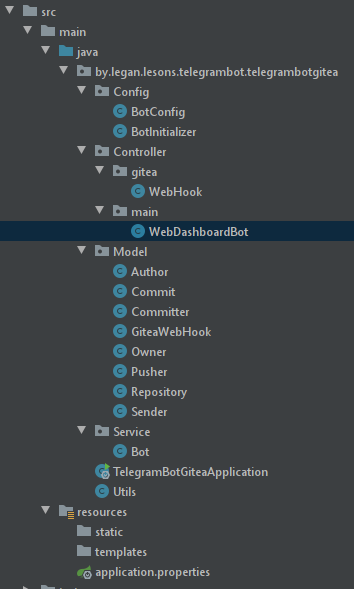
Dan sekarang lebih detail untuk setiap kelas:
BotConfig - Konfigurasi menarik pengaturan bot dari application.properties
@Configuration
@Data
@PropertySource("classpath:application.properties")
public class BotConfig {
//
@Value("${botUserName}")
String botUserName;
//
@Value("${token}")
String token;
}
BotInitializer - Component / Telegram
@Component
@Slf4j
public class BotInitializer {
@Autowired
Bot bot;
@EventListener({ContextRefreshedEvent.class})
public void Init() throws TelegramApiException {
TelegramBotsApi telegramBotsApi = new TelegramBotsApi(DefaultBotSession.class);
try {
telegramBotsApi.registerBot(bot);
} catch (TelegramApiRequestException e) {
log.error(exceptionStackTraceToString(e));
}
}
}
API Spring, ContextRefreshedEvent
Bot - TelegramLongPollingBot,
@Component
@Slf4j
/**
* Telegram
* , ,
*/
public class Bot extends TelegramLongPollingBot {
final
BotConfig config;
public Bot(BotConfig config) {
this.config = config;
}
public void onUpdateReceived(Update update) {
update.getUpdateId();
SendMessage.SendMessageBuilder builder =SendMessage.builder();
String messageText;
String chatId;
if (update.getMessage() != null) {
chatId = update.getMessage().getChatId().toString();
builder.chatId(chatId);
messageText = update.getMessage().getText();
} else {
chatId = update.getChannelPost().getChatId().toString();
builder.chatId(chatId);
messageText = update.getChannelPost().getText();
}
if (messageText.contains("/hello")) {
builder.text("");
try {
execute(builder.build());
} catch (TelegramApiException e) {
log.debug(e.toString());
}
}
if (messageText.contains("/chartId")) {
builder.text("ID : " + chatId);
try {
execute(builder.build());
} catch (TelegramApiException e) {
log.debug(e.toString());
}
}
}
public String getBotUsername() {
return config.getBotUserName();
}
public String getBotToken() {
return config.getToken();
}
}
Telegram
onUpdateReceived
WebHook - RestController API WebHook Gitea
@Slf4j
@RestController
@RequestMapping("/api/public/gitea")
@RequiredArgsConstructor
@PropertySource("classpath:application.properties")
public class WebHook {
Bot bot;
//
@Value("${chartId}")
String chartId;
// JSON Gitea,
// .. API
@Value("${secret}")
String secret;
@Autowired
public WebHook(Bot bot) {
this.bot = bot;
}
@PostMapping(value = "/webhook")
public ResponseEntity<?> webhook(@RequestBody String json){
Gson gson = new Gson();
GiteaWebHook giteaWebHook = null;
try {
giteaWebHook = gson.fromJson(json, GiteaWebHook.class);
} catch (JsonSyntaxException e) {
log.error(Utils.exceptionStackTraceToString(e));
return new ResponseEntity<>(Utils.exceptionStackTraceToString(e), HttpStatus.BAD_REQUEST);
}
if (validationWebHookContent(giteaWebHook)) {
SendMessage.SendMessageBuilder messageBuilder =SendMessage.builder();
messageBuilder.chatId(chartId);
messageBuilder.parseMode(ParseMode.HTML);
StringBuilder builder = new StringBuilder();
builder.append("<b></b> : " + giteaWebHook.getRepository().getName()+"\n");
for (Commit commit : giteaWebHook.getCommits()) {
builder.append("<b></b> : " + commit.getAuthor().getName()+"\n");
builder.append("<b></b> : " + commit.getMessage()+"\n");
}
builder.append("<a href=\"https://play.google.com/store/apps/details?id=URL__\"> Play Market </a>\n");
messageBuilder.text(buildToCorrectString(builder));
try {
bot.execute(messageBuilder.build());
} catch (TelegramApiException e) {
log.error(Utils.exceptionStackTraceToString(e));
return new ResponseEntity<>(Utils.exceptionStackTraceToString(e), HttpStatus.INTERNAL_SERVER_ERROR);
}
} else return new ResponseEntity<>(HttpStatus.BAD_REQUEST);
HttpHeaders headers = new HttpHeaders();
headers.add("Content-Type", "application/json; charset=utf-8");
return new ResponseEntity<>(headers, HttpStatus.OK);
}
/**
* JSON
* @param giteaWebHook - GiteaWebHook
* @return true - null, PUSH master,
*/
private boolean validationWebHookContent(GiteaWebHook giteaWebHook){
return giteaWebHook != null && //
giteaWebHook.getRef().contains(giteaWebHook.getRepository().getDefaultBranch()) && // PUSH /master
giteaWebHook.getSecret().equals(secret); //
}
private String buildToCorrectString(StringBuilder builder){
return builder.toString()
.replace("_", "\\_")
.replace("*", "\\*")
.replace("[", "\\[")
.replace("`", "\\`")
.replace(" ", " ")
.replace("&frac", " ")
.replaceAll(" \\u003c","");
}
}
RestController RestAPI http://you_ip:port/api/public/gitea/webhook , Gitea PUSH JSON WebHook .
TelegramBotGiteaApplication - Spring Boot
@SpringBootApplication
@AutoConfigurationPackage
public class TelegramBotGiteaApplication extends SpringBootServletInitializer {
public static void main(String[] args) {
new SpringApplicationBuilder(TelegramBotGiteaApplication.class)
.run(args);
}
}
Model , GiteaWebHook JSON-Schema GiteaWebHookApi , http://www.jsonschema2pojo.org/
Gitea WebHook
API Gitea . - WebHook .git\hooks\post-update curl , API GitHub , Gitea:
, . Webhook , Gitea
URL URL RestController http://you_ip:port/api/public/gitea/webhook
- application/json
- application.properties
webhook ? - PUSH
.
, Gitea - .
Google Cloud Platform,
New customers get $300 in free credits to spend on Google Cloud. All customers get free usage of 20+ products. See offer details.
, 300$ , .
1) ompute Engine,
2) ,

,

8080
C VPS -

8080 80
VM SSH ,

sudo apt update
Java
sudo apt install default-jdk
java - version
Java SSH

maven
sudo apt install maven
clone
git clone https://legan.by/gitea/leganas/TelegramBotGiteaLesson.git
appliation.properties , bot_name token
nano ./TelegramBotGiteaLesson/src/main/resources/application.properties
maven
cd TelegramBotGiteaLesson/
mvn package
maven
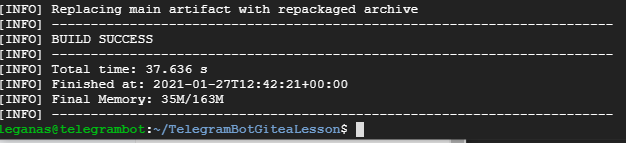
,
java -jar ./target/telegrambotgitea-0.0.1-SNAPSHOT.jar
IP web , http://YOU_IP:8080/
Telegram /hello ,

Telegram , ( ) !
,
/chartId

ID application.properties , jar. IP WebHook Gitea .

, , jar , , .
, .