
pengantar
Menurut statistik tahun 2020, hingga 45% karyawan organisasi membuka email phishing, 20-30% mengklik tautan yang tidak diinginkan di email semacam itu, dan 10 hingga 15% memasukkan kredensial mereka pada sumber daya phishing. Persentase ini didasarkan pada faktor-faktor berikut:
email phishing melewati semua filter spam dan dikirim ke target mereka (korban)
surat berisi informasi yang relevan untuk karyawan dari organisasi tertentu dalam jangka waktu tertentu.
. .
. , , smtp- rDNS , DNS- -, .
VPS - «» IP.
Ubuntu 18.04.5 LTS c :
Postfix 3.3.0-1
OpenDKIM 2.11.0
Dovecot 2.2.33.2
Certbot 0.27.0
"example.com" 192.168.10.0/24.
smtp-
smtp- Postfix. smtp- Postfix :
apt-get install postfix
Postfix «Internet Site» main.cf
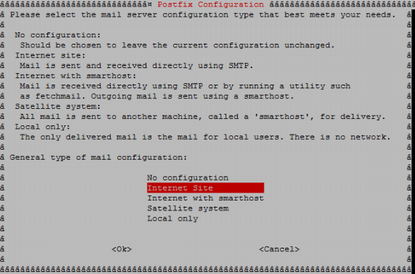
Postfix . , .
postconf –e 'myhostname=example.com'
postconf –e 'mynetworks=192.168.10.0/24'
OpenDKIM
, Postfix , , , smtp-.
DKIM Postfix. , . OpenDKIM - DKIM. OpenDKIM :
apt-get install opendkim opendkim-tools -y
C /etc/opendkim/example.com RSA.
openssl genrsa -out dkimprivate.key 1024
openssl rsa -pubout -in dkimprivate.key -out dkimpublic.key
: openssl, .. , opendkim-genkey, DKIM.
/etc/opendkim/TrustedHosts :
localhost
#
*.example.com
/etc/opendkim/signingtable, , , From, :
*@example.com mail._domainkey.example.com
/etc/opendkim/keytable, , :
mail._domainkey.example.com example.com:mail:/etc/opendkim/example.com/dkimprivate.key
/etc/opendkim.conf :
UMask 002 Domain example.com KeyFile /etc/opendkim/example.com/dkimprivate.key Selector mail UserID opendkim:opendkim SyslogSuccess Yes LogWhy Yes Background Yes Canonicalization relaxed/relaxed ExternalIgnoreList refile:/etc/opendkim/TrustedHosts InternalHosts refile:/etc/opendkim/TrustedHosts KeyTable refile:/etc/opendkim/keys/keytable SigningTable refile:/etc/opendkim/keys/signingtable Mode sv PidFile /var/run/opendkim/opendkim.pid SignatureAlgorithm rsa-sha256 Socket inet:8891@localhost
, :
Domain: ,
KeyFile: , RSA, openssl
UserID: , OpenDKIM
ExternalIgnoreList: , , .
InternalHosts: , , ,
KeyTable:
SigningTable: , , ":"
PidFile: PID ,
SignatureAlgorithm:
Socket: OpenDKIM. Postfix
Postfix OpenDKIM :
echo 'SOCKET="inet:8891@localhost"' >> /etc/default/opendkim
postconf -e milter_default_action=accept
postconf -e milter_protocol=2
postconf -e smtpd_milters = inet:localhost:8891
postconf -e non_smtpd_milters = $smtpd_milters
Postfix OpenDKIM . :
postfix check opendkim -n
, Postfix OpenDKIM :
systemctl restart postfix systemctl restart opendkim systemctl status postfix systemctl status opendkim
*
OpenDKIM , pid- opendkim.pid, /lib/systemd/system/opendkim.service :
#PIDFile=/var/run/opendkim/opendkim.pid
OpenDKIM.
DNS-
SPF DNS- :

:
v - , SPF1
ip4 - IP- ,
a - ,
mx - , MX
~all - , ip- ( «»).
DKIM DNS-:

:
v - , DKIM1
k – , RSA
p -
: RSA . /etc/opendkim/< >/dkimpublic.key
DMARC DNS-:

:
v - , DMARC1
p - , none - " , "
aspf - , r - ,
sp - , none - " , "
, . Mxtoolbox.
Dovecot Certbot
Dovecot Certbot. Dovecot , smtp-. Certbot SSL- Let's Encrypt. Dovecot Certbot :
apt-get install dovecot-imapd dovecot-pop3d certbot
Let's Encrypt :
certbot certonly --standalone -d example.com
/etc/letsencrypt/live/examle.com
Postfix. :
postconf -e smtpd_tls_cert_file = /etc/letsencrypt/live/example.com/fullchain.pem postconf -e smtpd_tls_key_file = /etc/letsencrypt/live/example.com/privkey.pem postconf -e smtp_tls_security_level = may postconf -e smtpd_tls_security_level = may postconf -e smtp_tls_note_starttls_offer = yes postconf -e smtpd_tls_loglevel = 1 postconf -e smtpd_tls_received_header = yes postconf -e smtpd_use_tls=yes postconf -e smtpd_sasl_type = dovecot postconf -e smtpd_sasl_path = private/auth postconf -e smtpd_sasl_local_domain = example.com postconf -e smtpd_sasl_security_options = noanonymous postconf -e broken_sasl_auth_clients = yes postconf -e smtpd_sasl_auth_enable = yes postconf -e smtpd_recipient_restrictions = permit_sasl_authenticated, permit_mynetworks, reject_unauth_destination
, :
smtpd_tls_cert_file - ,
smtpd_tls_key_file - ,
smtp_sasl_auth_enable - , sasl
smtpd_sasl_path - , SASL
smtp_sasl_security_options - , , . noplaintext - ,
smtp_sasl_type - sasl,
smtpd_recipient_restrictions - ,
. /etc/postfix/main.cf:
virtualaliasdomains = $mydomain
virtualaliasmaps = hash:/etc/postfix/virtual
/etc/postfix/virtual :
admin@example.com root
info@example.com root
/etc/postfix/master.cf :
-o smtpdtlswrappermode=yes
-o smtpdsaslauthenable=yes
-o smtpdmilters=inet:localhost:8891
Dovecot. /etc/dovecot/conf.d/10-auth.conf :
disableplaintextauth = yes
…
authmechanisms = plain login
/etc/dovecot/conf.d/10-mail.conf :
maillocation = maildir: ~ / Maildir
/etc/dovecot/conf.d/10-master.conf service auth :
service auth {
…
# Postfix smtp-auth
unixlistener / var / spool / postfix / private / auth {
mode = 0660
user = postfix
group = postfix
}
/etc/dovecot/conf.d/10-ssl.conf :
ssl = required
sslcert = </etc/letsencrypt/live/example.com/fullchain.pem
sslkey = </etc/letsencrypt/live/example.com/privkey.pem
sslprotocols = !SSLv3 !TLSv1.1 TLSv1.2
sslcipherlist = ALL:!LOW:!SSLv2:!EXP:!aNULL
*: , Certbot .
Postfix Dovecot, :
postfix check
dovecot -n
systemctl restart postfix
systemctl restart dovecot
systemctl status postfix
systemctl status dovecot
Postfix, Opendkim, Dovecot Mail-Tester, , , , .
echo "Test mail" | mail test-c69hzynjz@srv1.mail-tester.com -s "Hello" -a "MIME-Version: 1.0" -a "Content-Type: text/plain"
Ini melengkapi tahap persiapan. Di bagian selanjutnya dari seri ini, kita akan mengeksplorasi proses pengembangan topik untuk email phishing untuk hasil yang lebih efektif, proses pembentukan grup target, dan juga mempertimbangkan alat apa yang paling cocok untuk membuat sumber daya web phishing dan berbagai jenis email.