Sedikit kesenangan dengan computer vision dan CNN dengan database kecil.
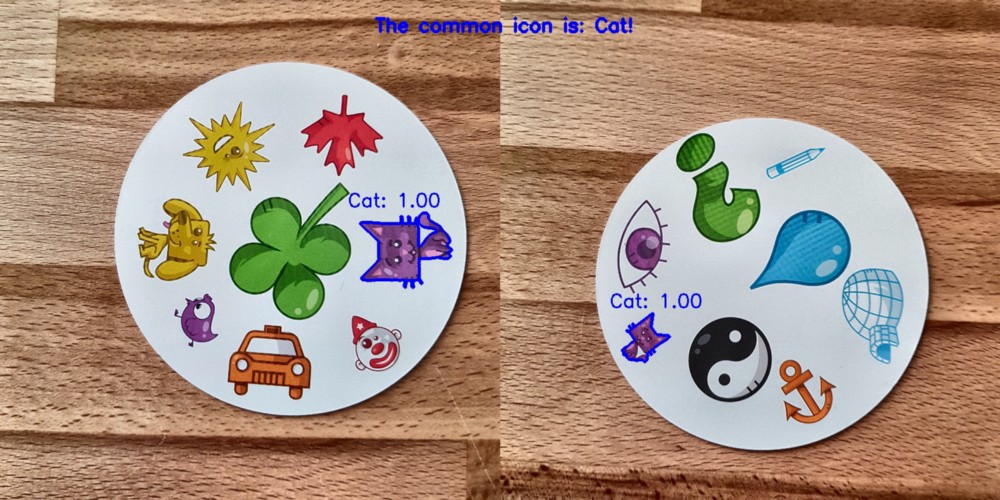
, CNN, , . , , . , Spot it! ( , ).
, , : , . Spot it!, . . , . 55 , , .
?
data science . , . 330 . . : (CNN)? !
, , ? , : . , . . , : , ( ) ( ) , ( ) ( ) . .
Lab . L , a , b — . OpenCV:
import cv2
import imutils
imgname = 'picture1'
image = cv2.imread(f’{imgname}.jpg’)
lab = cv2.cvtColor(image, cv2.COLOR_BGR2LAB)
l, a, b = cv2.split(lab)
, :
clahe = cv2.createCLAHE(clipLimit=3.0, tileGridSize=(8,8))
cl = clahe.apply(l)
limg = cv2.merge((cl,a,b))
final = cv2.cvtColor(limg, cv2.COLOR_LAB2BGR)
:
resized = cv2.resize(final, (800, 800))
#
cv2.imwrite(f'{imgname}processed.jpg', blurred)
!
. OpenCV. -, ( , 190), . :
image = cv2.imread(f’{imgname}processed.jpg’)
gray = cv2.cvtColor(image, cv2.COLOR_RGB2GRAY)
thresh = cv2.threshold(gray, 190, 255, cv2.THRESH_BINARY)[1]
#
cnts = cv2.findContours(thresh.copy(), cv2.RETR_EXTERNAL, cv2.CHAIN_APPROX_SIMPLE)
cnts = imutils.grab_contours(cnts)
output = image.copy()
#
for c in cnts:
cv2.drawContours(output, [c], -1, (255, 0, 0), 3)
, , : . , .
# ,
cnts = sorted(cnts, key=cv2.contourArea, reverse=True)[0]
#
mask = np.zeros(gray.shape,np.uint8)
mask = cv2.drawContours(mask, [cnts], -1, 255, cv2.FILLED)
#
fg_masked = cv2.bitwise_and(image, image, mask=mask)
# ( )
mask = cv2.bitwise_not(mask)
bk = np.full(image.shape, 255, dtype=np.uint8)
bk_masked = cv2.bitwise_and(bk, bk, mask=mask)
#
final = cv2.bitwise_or(fg_masked, bk_masked)
! , — . , . :
# ( )
gray = cv2.cvtColor(final, cv2.COLOR_RGB2GRAY)
thresh = cv2.threshold(gray, 195, 255, cv2.THRESH_BINARY)[1]
thresh = cv2.bitwise_not(thresh)
cnts = cv2.findContours(thresh.copy(), cv2.RETR_EXTERNAL, cv2.CHAIN_APPROX_SIMPLE)
cnts = imutils.grab_contours(cnts)
cnts = sorted(cnts, key=cv2.contourArea, reverse=True)[:10]
#
i = 0
for c in cnts:
if cv2.contourArea(c) > 1000:
# ,
mask = np.zeros(gray.shape, np.uint8)
mask = cv2.drawContours(mask, [c], -1, 255, cv2.FILLED)
#
fg_masked = cv2.bitwise_and(image, image, mask=mask)
mask = cv2.bitwise_not(mask)
bk = np.full(image.shape, 255, dtype=np.uint8)
bk_masked = cv2.bitwise_and(bk, bk, mask=mask)
finalcont = cv2.bitwise_or(fg_masked, bk_masked)
#
output = finalcont.copy()
x,y,w,h = cv2.boundingRect(c)
# squares io rectangles
if w < h:
x += int((w-h)/2)
w = h
else:
y += int((h-w)/2)
h = w
#
roi = finalcont[y:y+h, x:x+w]
roi = cv2.resize(roi, (400,400))
#
cv2.imwrite(f"{imgname}_icon{i}.jpg", roi)
i += 1
! . , , 57 ( 57 ). :
symbols ├── test │ ├── anchor │ ├── apple │ │ ... │ └── zebra ├── train │ ├── anchor │ ├── apple │ │ ... │ └── zebra └── validation ├── anchor ├── apple │ ... └── zebra
, ( 2500)! , GitHub. , …
(CNN)
. . softmax 57 .
:
#
from keras import layers
from keras import models
from keras import optimizers
from keras.preprocessing.image import ImageDataGenerator
import matplotlib.pyplot as plt
# , 57 ( )
model = models.Sequential()
model.add(layers.Conv2D(32, (3, 3), activation='relu', input_shape=(400, 400, 3)))
model.add(layers.MaxPooling2D((2, 2)))
model.add(layers.Conv2D(64, (3, 3), activation='relu'))
model.add(layers.MaxPooling2D((2, 2)))
model.add(layers.Conv2D(128, (3, 3), activation='relu'))
model.add(layers.MaxPooling2D((2, 2)))
model.add(layers.Conv2D(256, (3, 3), activation='relu'))
model.add(layers.MaxPooling2D((2, 2)))
model.add(layers.Conv2D(256, (3, 3), activation='relu'))
model.add(layers.MaxPooling2D((2, 2)))
model.add(layers.Conv2D(128, (3, 3), activation='relu'))
model.add(layers.Flatten())
model.add(layers.Dropout(0.5))
model.add(layers.Dense(512, activation='relu'))
model.add(layers.Dense(57, activation='softmax'))
model.compile(loss='categorical_crossentropy', optimizer=optimizers.RMSprop(lr=1e-4), metrics=['acc'])
. — . , , , . Keras:
#
train_dir = 'symbols/train'
validation_dir = 'symbols/validation'
test_dir = 'symbols/test'
# ImageDataGenerator Keras ( )
train_datagen = ImageDataGenerator(rescale=1./255, rotation_range=40, width_shift_range=0.1, height_shift_range=0.1, shear_range=0.1, zoom_range=0.1, horizontal_flip=True, vertical_flip=True)
test_datagen = ImageDataGenerator(rescale=1./255)
train_generator = train_datagen.flow_from_directory(train_dir, target_size=(400,400), batch_size=20, class_mode='categorical')
validation_generator = test_datagen.flow_from_directory(validation_dir, target_size=(400,400), batch_size=20, class_mode='categorical')
, :
, .
history = model.fit_generator(train_generator, steps_per_epoch=100, epochs=100, validation_data=validation_generator, validation_steps=50)
#
model.save('models/model.h5')
, , . :
, . ( ) . .
: . , 0,995 .
. , , , . :
- : .
( ).
. ( ).
GitHub , main.py.
:
? , ! , . ! :
? : , ! : 55 . 1485 . 140 . , !
Menurut saya tidak terlalu sulit untuk membuat model 100%. Ini dapat dilakukan dengan menggunakan pembelajaran transfer, misalnya. Untuk memahami apa yang dilakukan model, kita dapat merender lapisan untuk gambar uji. Apa yang harus dicoba lain kali!
Semoga Anda menikmati membaca posting ini! ❤