Nama saya Ksyusha Lugovaya. Di SberCorus, saya mendukung pustaka komponen Korus-UI React.
Hampir setiap pengembang cepat atau lambat menghadapi masalah dalam memilih perpustakaan, dan terkadang solusinya bisa jadi tidak sepele. Muncul pertanyaan: apa yang harus dipandu saat memilih perpustakaan, solusi populer apa yang ditawarkan pasar, apa pro dan kontra mereka? Review dan testimonial tidak selalu membantu Anda menemukan solusi.
Di dunia pembangunan, tidak ada yang cocok untuk semua situasi. Oleh karena itu, dalam artikel saya akan memberi tahu Anda bagaimana kami menyelesaikan masalah ini, dan saya akan menganalisis dengan contoh menganalisis beberapa solusi populer bagaimana memilih perpustakaan komponen React untuk proyek Anda.
Kriteria utama memilih perpustakaan
Skenario penggunaan perpustakaan. Ini terdengar jelas, tetapi pemahaman yang jelas tentang tugas adalah kriteria pemilihan utama.
Jenis komponen aplikasi. Jenis aplikasi menentukan komponen yang Anda butuhkan. Seringkali satu set tombol / kotak centang, bidang input dasar, daftar / menu dengan gaya siap pakai sudah cukup. Ini berarti Anda dapat menggunakan komponen sederhana dengan jumlah minimum pengaturan dan gaya siap pakai.
Kustomisasi, pemformatan, dan interaktivitas dalam desain. Jika Anda perlu memformat dan menata komponen Anda secara signifikan, ini juga penting untuk diputuskan sebelumnya.
Saat persyaratan dinyatakan dengan jelas, jawab pertanyaan:
Apakah dokumentasi proyek ditulis dengan baik, apakah ada contoh interaktif?
Seberapa aktif proyek ini didukung?
Berapa banyak masalah yang ada dalam proyek dan seberapa cepat diselesaikan?
Apakah proyek tersebut gratis atau berlisensi komersial?
Seberapa mudah komponen disesuaikan?
Apakah kode perpustakaan tercakup dalam tes?
?
, . , — .
, :
Material-UI,
Semantic-UI-React,
yandex-ui,
arui-feather,
Korus-UI.
, – Material-UI Semantic-UI-React, .
– , (, ) , opensource .
.
— , .
.
Layout-
, , , . :
;
props.children;
;
: h1, section, div, span, Icon, Avatar.
- , . , Material-UI Semantic-UI . - .
- (controls)
, , , , — , «» .
:
;
props;
UI (disabled, required, isLoading).
, .
:
;
layout- (, , );
.
|
|
Layout |
Controls |
Modules |
|
Material-UI |
App Bar, Avatars, Badges, Bottom Navigation, Divider, Grid List, Lists, Paper, Progress, Snackbar, Tables, |
Button, Chip, Selection Controls, Text Fields, Pickers* |
Dialog, Cards, Drawers, ExpansionPanel, Menu, Stepper, Tabs, Tooltip |
26** |
Semantic-UI-React |
Container, Divider, Flag, Header, Icon, Image, Label, List, Loader, Placeholder, Rail, Reveal, Segment, Step, Breadcrumb, Form, Grid, Menu, Message, Table, Advertisement, Card, Comment, Feed, Item, Statistic |
Button, Input, Checkbox, Radio, Select, Text Area |
Accordion, Dimmer, Dropdown, Embed, Modal, Popup, Progress, Rating, Search, Sidebar, Sticky, Tab, Transition, Visibility, Confirm, Pagination, Portal, Ref, Transitionable Portal |
52 |
yandex-ui |
Badge, Divider, Icon, Image, Text, UserPic, ListTile, Spacer, Link, Spin |
Attach, Button, Checkbox, Menu, Radiobox, RadioButton, Select, Slider, Textarea, Textinput, Tumbler |
TabsMenu, Drawer, Dropdown, Messagebox, Modal, Popup, TabsPanes, Tooltip, Progress |
30 |
arui-feather |
Amount, CardImage, FlagIcon, Form, GridRow, GridCol, Heading, Icon, InputGroup, Label, Link, List, Paragraph, Spin |
Attach, Button, CardInput, CheckBoxGroup, CheckBox, FormField, IconButton, Input, RadioGroup, Radio, Select, TagButton, Textarea, Toggle |
CalendatInput, Calendar, Collapse, EmailInput, InputAutocomplete, IntlPhoneInput, Menu, MoneyInput, Notification, PhoneInput, Plate, Popup, ProgressBar, Sidebar, SlideDown, Tabs |
44 |
Korus-UI |
HTML tags factory***, Currency, Tags |
Button, Checkbox, Input, Radio, Rating, Slider, Switcher, Textarea |
Autocomplete, ButtonGroup, Collapse, Collapsible, DatePicker, DateRange, DateTimePicker, DateTimeRange, Dropdown, DropdownLink, DropdownSelect, Dropzone, FileDrop, FileUpload, Loader, MaskedInput, Modal, MultiSelect, Notifications, NumericRange, NumericTextBox, Pagination, Password, ProgressBar, StatusBar, StickyPanel, Tabs, TimePicker, TimeRange, Tooltip, Tour, Validation, VStepper, Wizard, form |
45 + - HTML- |
*Material-UI
** ,
***Korus-UI HTML- c API
50% Material-UI Semantic-UI-React 30% yandex-ui arui-feather — layout-. Korus-UI 70% — .
. .
Material-UI
MuiThemeProvider. React .
. className.
classes.
CSS-in-Js, , CSS-. CSS-in-Js HOC withStyles() makeStyles() .
Semantic-UI-React
Semantic-UI-React , Semantic-UI.
, .
:
-
css- ;
-
-
yandex-ui
. .
:
-
() ;
- yaml json. (css, json, js, ios, android) .
arui-feather ( )
. className, .
Korus-UI ()
LedaProvider. React .
. API- (. theme). .
. , , ( Loader ).
.
Material-UI
, List <ul>
. React :
<List component="nav">
<ListItem button>
<ListItemText primary="Trash" />
</ListItem>
<ListItem button>
<ListItemText primary="Spam" />
</ListItem>
</List>
Semantic-UI
Semantic-UI-React as:
<Button as='a' />
React- . .
yandex-ui
:
import React from 'react'
import { useRenderOverride } from '@yandex/ui/lib/render-override'
const ElementOriginal = ({ children }) => <div>{children}</div>
const MyComponent = ({ renderElement }) => {
const Element = useRenderOverride(ElementOriginal, renderElement)
return (
<>
<Element />
</>
)
}
yandex-ui .
arui-feather ( )
.
Korus-UI
API. Render. , , .
:
labelRender={() => <MyCustomLabel />}
:
({ Element, elementProps, componentProps, componentState }) => React.Node
Element
-
elementProps
- props
componentState
,componentProps
- props state
, , :
<L.CheckBox
labelRender={({ elementProps }) => <MyCustomLabel {…elementProps} />}
>
Label
</L.CheckBox>
React- 2 :
Typescript
PropTypes
React Typescript. , . PropTypes — .
Typescript. Semantic-UI JS, Typescript Semantic-UI-React, React.
— . , . , . .
, — . .
( ) ( ).
.
|
|
|
|
% |
Material-UI |
Chai, Mocha, Sinon |
Unit |
95.28% Statements 87.22% Branches 97.51% Functions 95.26% Lines |
Semantic-UI |
Jasmine, Karma |
Unit |
|
Semantic-UI-React |
Chai, Enzyme |
Unit |
|
yandex-ui |
Jest, Enzyme |
Unit |
|
arui-feather |
Jest, Enzyme |
Unit |
88.1% Statements 73.84% Branches 66.61% Functions 87.19% Lines |
Korus-UI |
Cypress, Jest |
Unit, end-to-end |
69.28% Statements 56.14% Branches 66.29% Functions 71.78% Lines |
, . Storybook .
|
|
|
|
Storybook |
Material-UI |
https://material-ui.com/ru/ |
- |
- |
Semantic-UI-React |
https://react.semantic-ui.com/ |
+ |
- |
yandex-ui |
https://yastatic.net/s3/frontend/lego/storybook/index.html |
- |
+ |
arui-feather |
https://digital.alfabank.ru/ |
+ |
- |
Korus-UI |
https://opensource.esphere.ru/korus-ui/ |
+ |
+ |
, . , .
. , , , , . : , .
-. , . , , .
Pulse GitHub Pull Request . Insights . .
Material-UI

Semantic-UI
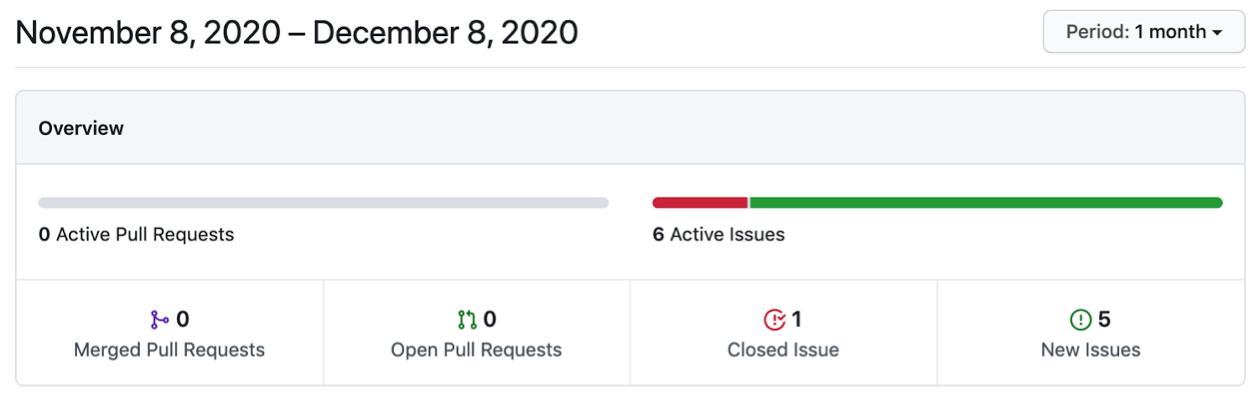
yandex-ui
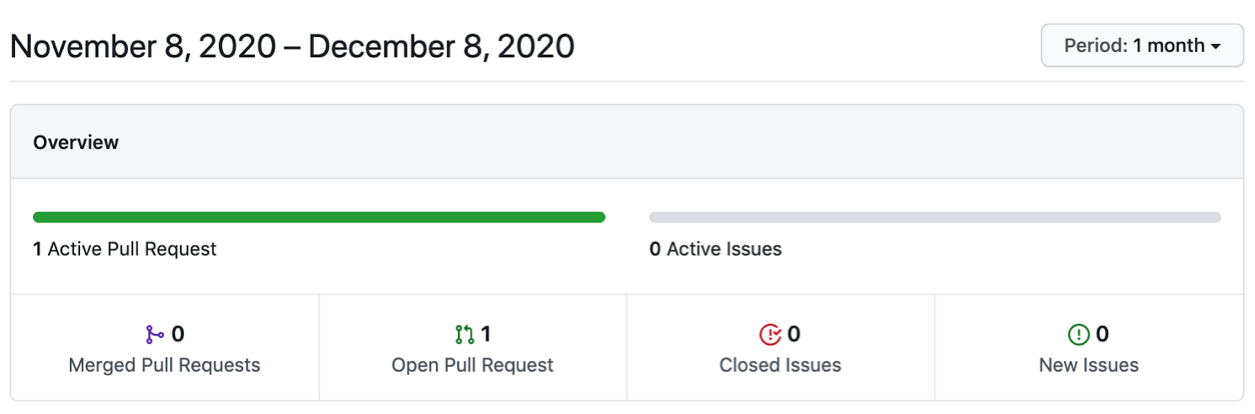
arui-feather ( )
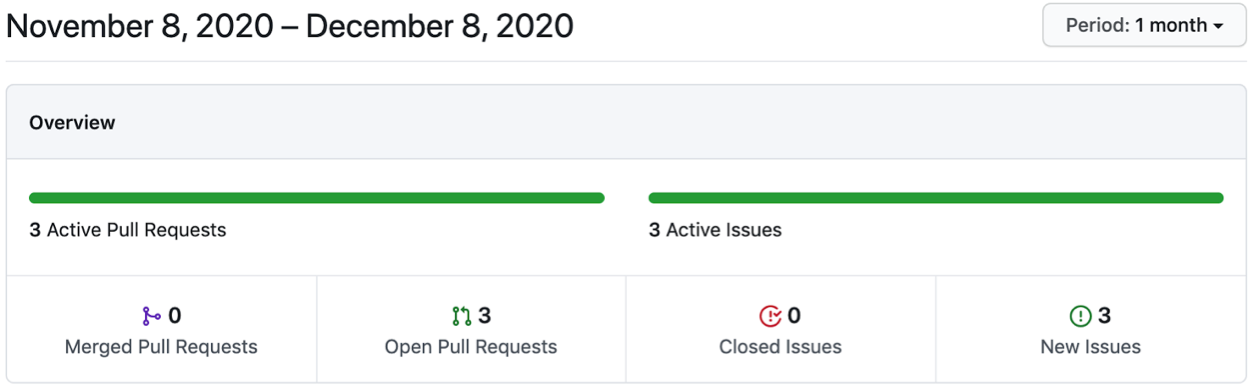
Korus-UI ()
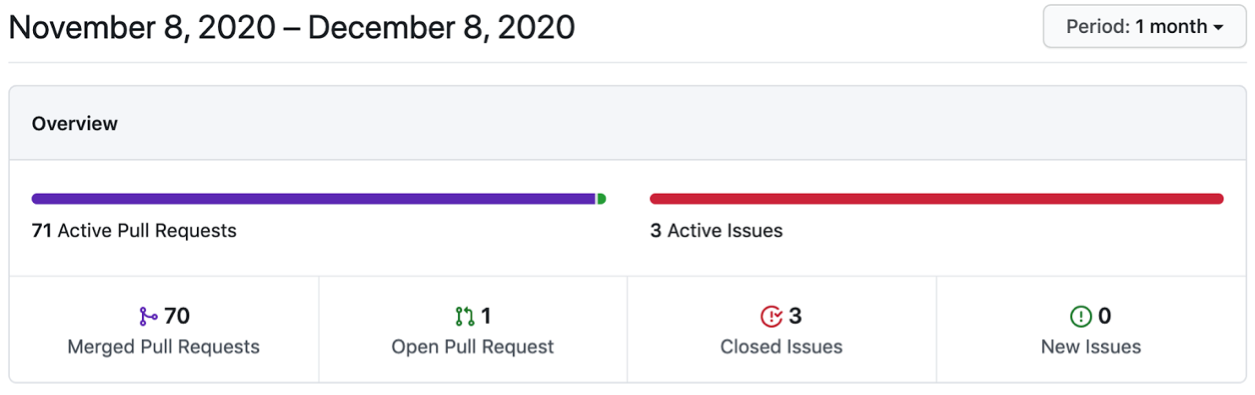
GitHub npm-. , . .
, — SEO-, . , , Stackoverflow, Medium, DEV. issues .
, , . .
|
|
|
|
, % |
Material-UI |
63 400 |
6 372 353 |
0,99 |
Semantic-UI |
48 800 |
541 299 |
9 |
Semantic-UI-React |
11 900 |
8 620 967 |
0,14 |
@yandex/ui |
212 |
15 902 |
1,33 |
arui-feather ( ) |
559 |
26 744 |
2 |
. . , , , . , .
: . , .
, , ( ). (-), .
.
: . , , , «».
Korus-UI
const BasicForm = () => (
<L.Div>
<L.Input
isRequired
requiredMessage="Login is required"
form="form"
name="login"
placeholder="Login"
/>
<L.Input
isRequired
requiredMessage="Password is required"
form="form"
name="password"
placeholder="Password"
/>
<L.Button _warning form="form">
Submit
</L.Button>
</L.Div>
);
Material-UI
const BasicForm = () => {
const [login, setLogin] = React.useState("");
const [loginError, setLoginError] = React.useState(false);
const [password, setPassword] = React.useState("");
const [passwordError, setPasswordError] = React.useState(false);
return (
<div>
<form
onSubmit={(e) => {
e.preventDefault();
setLoginError(!login);
setPasswordError(!password);
}}
>
<p>
<TextField
error={loginError}
placeholder="Login"
value={login}
onChange={(e) => {
setLoginError(false);
setLogin(e.target.value);
}}
onBlur={(e) => {
setLoginError(!login);
}}
helperText={loginError && "Login is required"}
/>
</p>
<p>
<TextField
error={passwordError}
placeholder="Password"
value={password}
onChange={(e) => {
setPasswordError(false);
setPassword(e.target.value);
}}
onBlur={(e) => {
setPasswordError(!password);
}}
helperText={passwordError && "Password is required"}
/>
</p>
<Button type="submit" color="primary" variant="contained">
Sign Up
</Button>
</form>
</div>
);
};
Semantic-UI-React
const BasicForm = () => {
const [login, setLogin] = React.useState("");
const [loginError, setLoginError] = React.useState(false);
const [password, setPassword] = React.useState("");
const [passwordError, setPasswordError] = React.useState(false);
return (
<div>
<Form
onSubmit={(e) => {
e.preventDefault();
setLoginError(!login);
setPasswordError(!password);
}}
>
<Form.Group>
<Form.Input
error={loginError && { content: "Login is required" }}
placeholder="Login"
name="login"
value={login}
onChange={(e) => {
setLoginError(false);
setLogin(e.target.value);
}}
onBlur={(e) => {
setLoginError(!login);
}}
/>
<Form.Input
error={passwordError && { content: "Password is required" }}
placeholder="password"
name="password"
value={password}
onChange={(e) => {
setPasswordError(false);
setPassword(e.target.value);
}}
onBlur={(e) => {
setPasswordError(!password);
}}
/>
<Form.Button content="Submit" />
</Form.Group>
</Form>
</div>
);
};
arui-feather
const BasicForm = () => {
const [login, setLogin] = React.useState("");
const [loginError, setLoginError] = React.useState(false);
const [password, setPassword] = React.useState("");
const [passwordError, setPasswordError] = React.useState(false);
return (
<Form
onSubmit={(e) => {
e.preventDefault();
setLoginError(!login);
setPasswordError(!password);
}}
>
<FormField>
<Input
error={loginError && "Login is required"}
placeholder="Login"
value={login}
onChange={(value) => {
setLoginError(false);
setLogin(value);
}}
onBlur={(e) => {
setLoginError(!login);
}}
/>
</FormField>
<FormField>
<Input
error={passwordError && "Password is required"}
placeholder="Password"
value={password}
onChange={(value) => {
setPasswordError(false);
setPassword(value);
}}
onBlur={(e) => {
setPasswordError(!password);
}}
/>
</FormField>
<FormField>
<Button view="extra" type="submit">
Submit
</Button>
</FormField>
</Form>
);
};
yandex-ui
const BasicForm = () => {
const [login, setLogin] = React.useState("");
const [loginError, setLoginError] = React.useState(false);
const [password, setPassword] = React.useState("");
const [passwordError, setPasswordError] = React.useState(false);
return (
<form
onSubmit={(e) => {
e.preventDefault();
setLoginError(!login);
setPasswordError(!password);
}}
className={cnTheme(theme)}
>
<Textinput
error={loginError}
placeholder="Login"
value={login}
onChange={(e) => {
setLoginError(false);
setLogin(e.target.value);
}}
onBlur={(e) => {
setLoginError(!login);
}}
hint={loginError && "Login is required"}
/>
<Textinput
error={loginError}
placeholder="Password"
value={password}
onChange={(e) => {
setPasswordError(false);
setPassword(e.target.value);
}}
onBlur={(e) => {
setPasswordError(!login);
}}
hint={passwordError && "Password is required"}
/>
<Button type="submit" view="action">
Submit
</Button>
</form>
);
};
, Korus-UI , .
Material-UI yandex-ui , Semantic-UI-React arui-feather <form>
.
, Korus-UI. .
React-
React-.
|
|
Korus-UI () |
Material-UI |
Semantic-UI-React |
arui-feather ( ) |
yandex-ui |
|
|
Storybook |
+ |
– |
– |
– |
+ |
|
+ |
– |
+ |
+ |
– |
|
|
Pull Request |
70 |
241 |
2 |
0 |
0 |
|
|
|
|
|
|
|
|
> 50% |
+ |
+ |
– |
+ |
|
E2E |
+ |
– |
– |
– |
– |
|
|
Chrome |
85.0.4183.121 |
>= 49 |
Last 2 v. |
Last 2 v. |
Last 2 v. |
Firefox |
81.0.1 |
>= 52 |
Last 2 v. |
Last 2 v. |
>= 23 |
|
Edge |
85.0.564.44 |
>=14 |
12+ |
Last 2 v. |
|
|
IE |
11 |
11 |
11+ |
11+ |
11+ |
|
Safari |
14 |
>= 10 |
Last 2 v. |
Last 2 v. |
|
|
Opera |
|
|
|
Last 2 v. |
>= 12.1 |
|
Yandex |
|
|
|
Last 2 v. |
? |
|
Android |
|
|
4.4+ |
5+ |
>= 4 |
|
iOS Safari |
|
|
7+ |
Last 2 v. |
>= 5.1 |
|
|
|
+ |
+ |
+ |
– |
+ |
|
|
+ |
+ |
+ |
– |
– |
|
|
Typescript |
Typescript |
Typescript |
Typescript |
Typescript |
|
GitHub , % |
– |
0,99 |
0,14 |
2 |
1,33 |
|
|
+ |
– |
+ |
+ |
– |
|
+ |
– |
– |
– |
– |
|
. , .
, , .
Korus-UI
: ? React .
, , . — , .
: , . .
React-, . , . , , .
Korus-UI 1,5 . opensource-.
Korus-UI
Korus-UI : form, . , , . , L.form()
. , .
Korus-UI onValidationFail, , . — .
Korus-UI — . :
RegExp
( )
isValid
unmounted
,
API
, _. css-:
<L.Div _flexBox> -> <div class="flex-box"></div>
className .
theme, css- .
Render (. ).
, :
{
…Event, // , React'
// component,
component: {
isValid?: boolean, // , onBlur
name?: string, // ,
value: any, //
… // (. API )
}
}
:
is: isOpen
, isValid
, isRequired
, isDisabled
has: hasCloseButton
should: shouldCorrectValue
ref
.
Korus-UI ref, React.
Korus-UI
, . , issue .
iOS Android. . .
React- Material-UI, Semantic-UI-React, arui-feather ( ), yandex-ui, Korus-UI (), .
, :
Korus-UI, . , , Korus-UI .
. , Storybook.
Korus-UI opensource GitHub. opensource, , :)
Saya juga ingin mengucapkan terima kasih kepada tim pengembangan SberCorus, ayah dan inspirator ideologis perpustakaan, Artem Povolskikh . Jika Anda tertarik dengan cara kerja pengembangan front-end di SberCorus, baca artikel Artyom .
Bagikan pengalaman Anda dengan pustaka komponen di komentar. Sangat menarik untuk mendiskusikan keuntungan dan kerugian apa yang Anda temui dari pengalaman pribadi dan fungsionalitas apa yang kurang dalam proses kerja.