Di bagian trilogi tentang Komponen Navigasi ini, kami akan menganalisis cara mengatur navigasi dalam aplikasi multi-modul, cara bekerja dengan tautan dalam, dan juga mempertimbangkan kasus dengan fragmen dan dialog yang disematkan.
Ini adalah artikel ketiga dan terakhir dalam seri tentang berbagai kasus navigasi dengan Komponen Navigasi. Anda juga dapat melihat pertama dan kedua bagian
Navigasi dalam aplikasi multi-modul
, , . , . , UI, ( API presentation-) . – , .

, : :vacancy :company flow. :vacancy :company, .
, .
App- +

: app-, feature-, feature-, . feature- Navigation Component, :
// ::vacancy module
interface VacancyRouterSource {

    fun openNextVacancy(vacancyId: String)

    // For navigation to another module
    fun openCompanyFlow()

}
app- , action- :
fun initVacancyDI(navController: NavController) {
  VacancyDI.vacancyRouterSource = object : VacancyRouterSource {
      override fun openNextVacancy(vacancyId: String) {
          navController.navigate(
              VacancyFragmentDirections
                .actionVacancyFragmentToVacancyFragment(vacancyId = vacancyId)
          )
      }

      override fun openCompanyFlow() {
          initCompanyDI(navController)
          navController.navigate(R.id.action__VacancyFragment__to__CompanyFlow)
      }
  }
}
– , . :
- , , DI feature-;
-
Safe Args,navArgs,Directions, Navigation Component- feature-, .
, , .
feature- +
– feature- ( – URI, Navigation Component 2.1).

, : app-, feature-, feature-, .
app- , . feature-.
<navigation xmlns:android="http://schemas.android.com/apk/res/android"
    android:id="@+id/company_flow__nav_graph"
    app:startDestination="@id/CompanyFragment">
    <fragment
        android:id="@+id/CompanyFragment"
        android:name="company.CompanyFragment">

        <deepLink app:uri="companyflow://company" />

        <!-- Or with arguments -->
        <argument android:name="company_id" app:argType="long" />
        <deepLink app:uri="companyflow://company" />

        <action
            android:id="@+id/action__CompanyFragment__to__CompanyDetailsFragment"
            app:destination="@id/CompanyDetailsFragment" />
    </fragment>

    <fragment
        android:id="@+id/CompanyDetailsFragment"
        android:name="company.CompanyDetailsFragment" />
</navigation>
Feature- , . , . deepLink, CompanyFragment .
CompanyFragment :vacancy :
// ::vacancy module

fragment_vacancy__button__open_company_flow.setOnClickListener {
  // Navigation through deep link
  val companyFlowUri = "companyflow://company".toUri()
  findNavController().navigate(companyFlowUri)
}
, . – Safe Args, «» (Enum, Serializable, Parcelable) .
P.S. , , JSON String- , -… .

- app-, – feature-; . , feature-. feature- common navigation.
? , common- destination- (, , activity), XML-! , Android Studio : XML- , , , , Safe Args . feature- common-, action- .
– - Navigation Component- feature-. :
- critical path feature-, ;
- : - destination-, , common-.
- .
- , , , , .
. Android- « ». , . , Navigation Component – , .
.

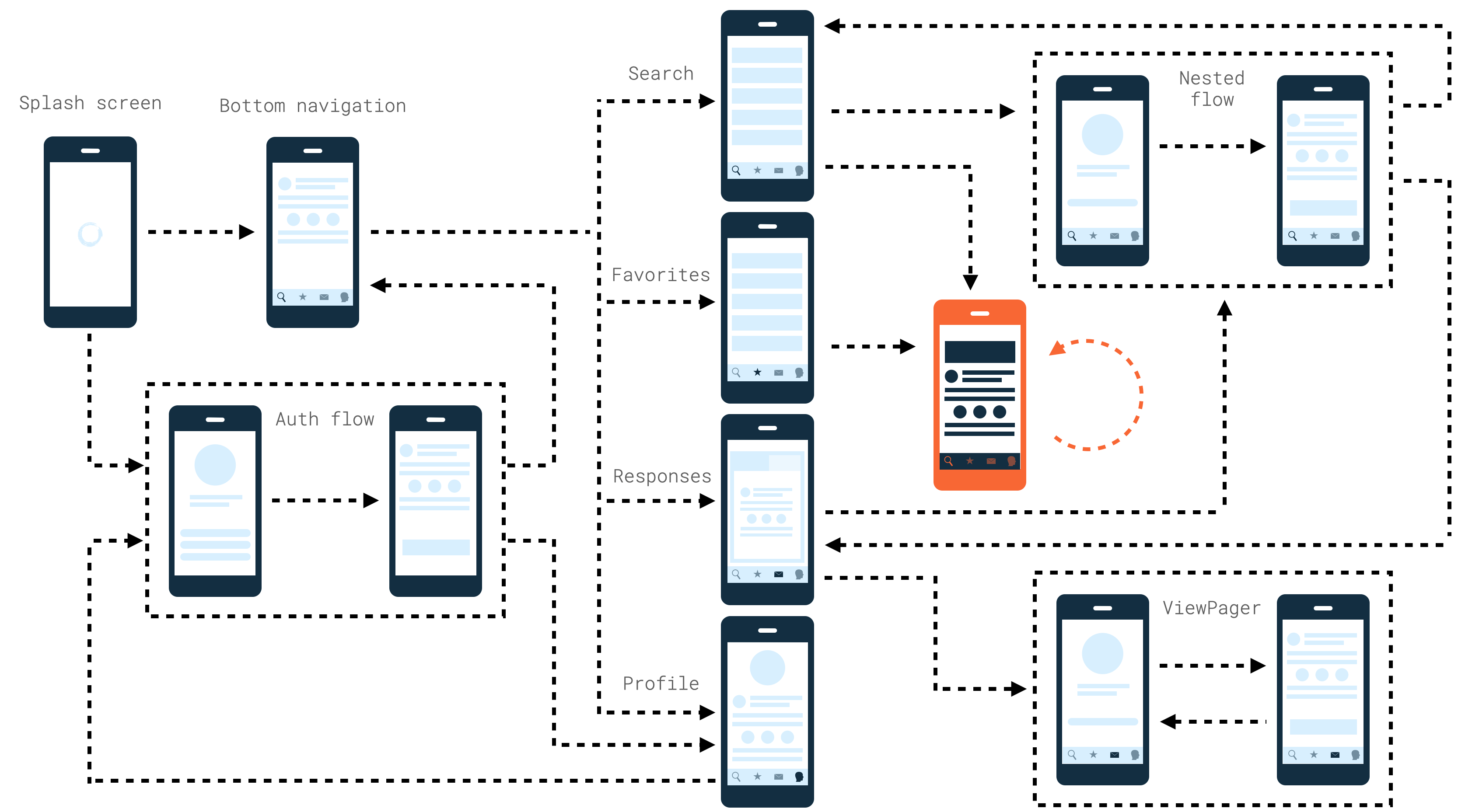
, Navigation Component.
- – , Splash-
, Favorites Splash-:

- ViewPager-
ViewPager- Responses:

- , – . Splash-, , ,
Profile . Splash-, , – Profile.

, . Navigation Component .
, . , ( , ):
<navigation xmlns:android="http://schemas.android.com/apk/res/android"
    android:id="@+id/app_nav_graph"
    app:startDestination="@id/SplashFragment">

    <fragment
        android:id="@+id/SplashFragment"
        android:name="ui.splash.SplashFragment" />

    <fragment
        android:id="@+id/MainFragment"
        android:name="ui.main.MainFragment">

        <deepLink app:uri="www.example.com/main" />

    </fragment>

</navigation>
, , Android Manifest:
<manifest xmlns:android="http://schemas.android.com/apk/res/android"
    package="com.aaglobal.jnc_playground">

    <application android:name=".App">
        <activity android:name=".ui.root.RootActivity">

            <nav-graph android:value="@navigation/app_nav_graph"/>

            <intent-filter>
                <action android:name="android.intent.action.MAIN" />
                <category android:name="android.intent.category.LAUNCHER" />
            </intent-filter>

        </activity>
    </application>

</manifest>
, , adb-:
adb shell am start \
  -a android.intent.action.VIEW \
  -d "https://www.example.com/main" com.aaglobal.jnc_playground
--… . . – IllegalStateException: FragmentManager is already executing transactions. , , Handler.post:
// MainFragment.kt — fragment with BottomNavigationView

override fun onViewCreated(view: View, savedInstanceState: Bundle?) {
    super.onViewCreated(view, savedInstanceState)
    if (savedInstanceState == null) {
        safeSetupBottomNavigationBar()
    }
}

private fun safeSetupBottomNavigationBar() {
    Handler().post {
        setupBottomNavigationBar()
    }
}
, : , Activity. activity . , URI, adb- – , , startDestination.
– .
<navigation xmlns:android="http://schemas.android.com/apk/res/android"
    android:id="@+id/menu__search"
    app:startDestination="@id/SearchContainerFragment">

    <fragment
        android:id="@+id/SearchContainerFragment"
        android:name="tabs.search.SearchContainerFragment">

        <deepLink app:uri="www.example.com/main" />

        <action
            android:id="@+id/action__SearchContainerFragment__to__CompanyFlow"
            app:destination="@id/company_flow__nav_graph" />
        <action
            android:id="@+id/action__SearchContainerFragment__to__VacancyFragment"
            app:destination="@id/vacancy_nav_graph" />
    </fragment>
</navigation>
, , :

, , Splash-. , ! Splash-, .
– , .
When a user opens your app via an explicit deep link, the task back stack is cleared and replaced with the deep link destination.
back stack , Navigation Component- . , - , - .
. – handleDeepLink NavController-:
public void handleDeepLink(@Nullable Intent intent) {
    // ...
    if ((flags & Intent.FLAG_ACTIVITY_NEW_TASK) != 0) {
        // Start with a cleared task starting at our root when we're on our own task
        if (!mBackStack.isEmpty()) {
            popBackStackInternal(mGraph.getId(), true);
        }
        int index = 0;
        while (index < deepLink.length) {
            int destinationId = deepLink[index++];
            NavDestination node = findDestination(destinationId);
            if (node == null) {
                final String dest = NavDestination.getDisplayName(mContext, destinationId);
                throw new IllegalStateException("Deep Linking failed:"
                        + " destination " + dest
                        + " cannot be found from the current destination "
                        + getCurrentDestination());
            }
            navigate(node, bundle,
                    new NavOptions.Builder().setEnterAnim(0).setExitAnim(0).build(), null);
        }
        return true;
    }
}
, :
- Navigation Component;
- NavController ( , NavController- ) –
FixedNavController; - NavController- FixedNavController.
, ? , . , . , . .
, : auth-.
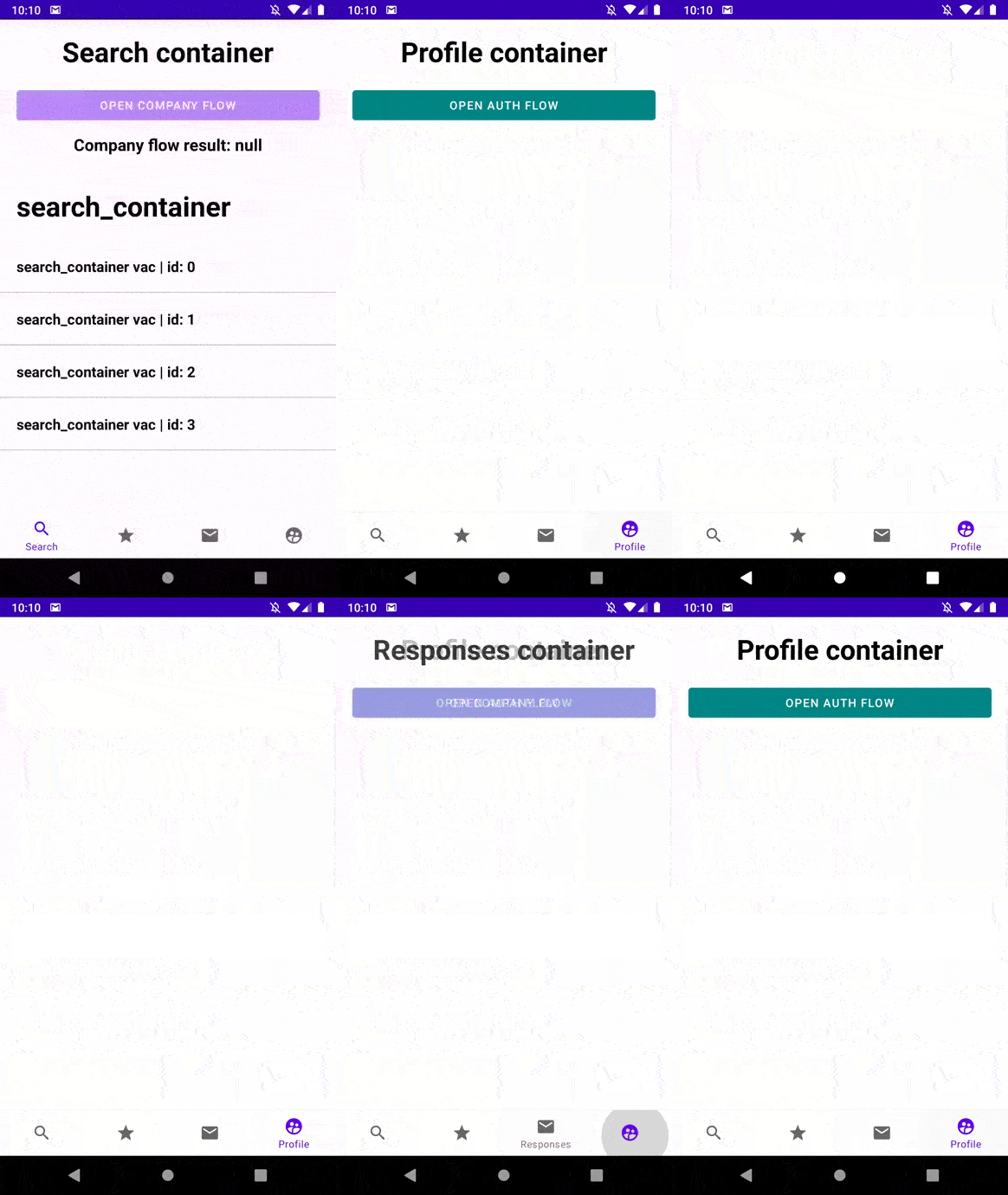
, Profile, . Back . - , Profile.
, . , , .
ViewPager-
NavController, , .
NavController- – isDeepLinkHandled, – , NavController . , , ViewPager, , :
if (findMyNavController().isDeepLinkHandled && requireActivity().intent.data != null) {
    val uriString = requireActivity().intent.data?.toString()
    val selectedPosition = when {
        uriString == null -> 0
        uriString.endsWith("favorites") -> 0
        uriString.endsWith("subscribes") -> 1
        else -> 2
    }
    fragment_favorites_container__view_pager.setCurrentItem(selectedPosition, true)
}
, , , NavController-, isDeepLinkHandled private-. , reflection-, .
,
Navigation Component . , Google :
- , ;
- , , – ;
- auth flow, .., ..
Navigation Component- .
Navigation Component
- , .
- – , AndroidManifest- .
- –
, , . . .
<A> <A>
, , .
, – :
<fragment
  android:id="@+id/VacancyFragment"
  android:name="com.aaglobal.jnc_playground.ui.vacancy.VacancyFragment"
  android:label="Fragment vacancy"
  tools:layout="@layout/fragment_vacancy">

  <argument
      android:name="vacancyId"
      app:argType="string"
      app:nullable="false" />

  <action
      android:id="@+id/action__VacancyFragment__to__VacancyFragment"
      app:destination="@id/VacancyFragment" />

</fragment>
– , Back . , , popUpTo action-.
hh . , , . , .

:
<LinearLayout xmlns:android="http://schemas.android.com/apk/res/android"
    android:layout_width="match_parent"
    android:layout_height="match_parent"
    android:orientation="vertical">

    <TextView
        android:id="@+id/fragment_favorites_container__text__title"
        style="@style/LargeTitle"
        android:text="Favorites container" />

    <androidx.fragment.app.FragmentContainerView
        android:id="@+id/fragment_favorites_container__container__recommend_vacancies"
        android:layout_width="match_parent"
        android:layout_height="match_parent" />

</LinearLayout>
runtime- :
class FavoritesContainerFragment : Fragment(R.layout.fragment_favorites_container) {

    override fun onViewCreated(view: View, savedInstanceState: Bundle?) {
        super.onViewCreated(view, savedInstanceState)

        childFragmentManager.attachFragmentInto(
          containerId = R.id.fragment_container_view,
          fragment = createVacancyListFragment()
        )

    }
}
attachFragmentInfo childFragmentManager – extension-, , .
:
class FavoritesContainerFragment : Fragment(R.layout.fragment_favorites_container) {

    // ...
    private fun createVacancyListFragment(): Fragment {
        return VacancyListFragment.newInstance(
          vacancyType = "favorites_container",
          vacancyListRouterSource = object : VacancyListRouterSource {
              override fun navigateToVacancyScreen(item: VacancyItem) {
                  findNavController().navigate(
                      R.id.action__FavoritesContainerFragment__to__VacancyFragment,
                      VacancyFragmentArgs(vacancyId = "${item.name}|${item.id}").toBundle()
                  )
              }
        }
     }

}
– , .
BottomSheetDialog-, Navigation Component.

- , . - dialog destination- , action .
<navigation xmlns:android="http://schemas.android.com/apk/res/android"
    android:id="@+id/menu__favorites"
    app:startDestination="@id/FavoritesContainerFragment">
   <dialog
        android:id="@+id/ABottomSheet"
        android:name="ui.dialogs.dialog_a.ABottomSheetDialog">
        <action
            android:id="@+id/action__ABottomSheet__to__BBottomSheet"
            app:destination="@id/BBottomSheet"
            app:popUpTo="@id/ABottomSheet"
            app:popUpToInclusive="true" />
    </dialog>

    <dialog
        android:id="@+id/BBottomSheet"
        android:name="ui.dialogs.dialog_b.BBottomSheetDialog">
        <action
            android:id="@+id/action__BBottomSheet__to__ABottomSheet"
            app:destination="@id/ABottomSheet"
            app:popUpTo="@id/BBottomSheet"
            app:popUpToInclusive="true" />
    </dialog>
</navigation>
, , Back .
-
– .
Navigation Component. , , - . , Navigation Component-, - .
, , . , – , -: , Cicerone. , , Navigation Component-.
- – Navigation Component; , , , .
- Navigation Component
- Navigation Component
- Navigation Component 2020 .
- BottomNavigationView