Saya terlibat dalam tata letak dan pemrograman situs web. Hampir setiap tata letak yang saya lakukan memiliki jendela modal. Biasanya ini adalah formulir pesanan panggilan di halaman arahan, pemberitahuan tentang penyelesaian beberapa proses, atau pesan kesalahan.
Tata letak jendela seperti itu pada awalnya merupakan tugas yang sederhana. Modal dapat dibuat bahkan tanpa bantuan JS hanya dengan menggunakan CSS, tetapi dalam praktiknya menjadi tidak nyaman, dan karena kekurangan kecil, modal mengganggu pengunjung situs.
Alhasil, dibuatlah solusi sederhana saya sendiri.
Secara umum, ada beberapa skrip siap pakai, pustaka JavaScript yang menerapkan fungsionalitas jendela modal, misalnya:
- Modal Arktik,
- jquery-modal,
- iziModal,
- Micromodal.js,
- tingle.js,
- Modal Bootstrap (dari pustaka Bootstrap), dll.
(artikel tidak mempertimbangkan solusi berdasarkan kerangka kerja Frontend)
Saya menggunakan beberapa dari mereka sendiri, tetapi hampir semua menemukan beberapa kekurangan. Beberapa di antaranya memerlukan pustaka jQuery untuk disertakan, yang tidak tersedia di semua proyek. Untuk mengembangkan solusi Anda, Anda harus terlebih dahulu menentukan persyaratannya.
? , «, » , - NikoX «arcticModal — jQuery- ».
, ?
- , , .
- . / .
- .
- . data-, .
- – .
- , .
- IE11+
.
1. HTML CSS
1.1.
? : HTML . / CSS.
HTML ( «hystmodal»):
<div class="hystmodal" id="myModal">
    <div class="hystmodal__window">
        <button data-hystclose class="hystmodal__close">Close</button>
          .
        <img src="img/photo.jpg" alt="  " />
    </div>
</div>
, </body> (.hystmodal). . id ( #myModal) ( ).
, .hystmodal . , CSS top, bottom, left right .
.hystmodal {
    position: fixed;
    top: 0;
    bottom: 0;
    right: 0;
    left: 0;
    overflow: hidden;
    overflow-y: auto;
    -webkit-overflow-scrolling: touch;
    display: flex;
    flex-flow: column nowrap;
    justify-content: center; /* .  */
    align-items: center;
    z-index: 99;
    /*
       */
    padding:30px 0;
}
:
- ,
.hystmodalflex- . - ,
overflow-y: auto, . , ( Safari)-webkit-overflow-scrolling: touch, .
.
.hystmodal__window {
    background: #fff;

    /*     600px
           */
    width: 600px;
    max-width: 100%;

    /*     */
    transition: transform 0.15s ease 0s, opacity 0.15s ease 0s;
    transform: scale(1);
}
.
№1. , .

- justify-content: center. ( ), . stackoverflow. – justify-content: flex-start, margin:auto. .
№2. ie-11 , .
: flex-shrink:0 – .
№3. Chrome (.. padding-bottom ).
, :
-
::afterpadding - .
. .hystmodal__wrap. №1, padding margin-top margin-top .hystmodal__window.
html:
<div class="hystmodal" id="myModal" aria-hidden="true" >
    <div class="hystmodal__wrap">
        <div class="hystmodal__window" role="dialog" aria-modal="true" >
            <button data-hystclose class="hystmodal__close">Close</button>
            <h1>  </h1>
            <p>   ...</p>
            <img src="img/photo.jpg" alt="" width="400" />
            <p>    ...</p>
        </div>
    </div>
</div>
aria role .
CSS .
.hystmodal__wrap {
    flex-shrink: 0;
    flex-grow: 0;
    width: 100%;
    min-height: 100%;
    margin: auto;
    display: flex;
    flex-flow: column nowrap;
    align-items: center;
    justify-content: center;
}
.hystmodal__window {
    margin: 50px 0;
    flex-shrink: 0;
    flex-grow: 0;
    background: #fff;
    width: 600px;
    max-width: 100%;
    overflow: visible;
    transition: transform 0.2s ease 0s, opacity 0.2s ease 0s;
    transform: scale(0.9);
    opacity: 0;
}
1.2
. , display none flex.
, display . , transition, .
visibility:hidden. , .
– . , visibility:hidden , - aria-hidden="true".
:
.hystmodal--active{
    visibility: visible;
}
.hystmodal--active .hystmodal__window{
    transform: scale(1);
    opacity: 1;
}
1.3
, html- . .hystmodal , ( opacity) . , .
.hysymodal__shadow </body>. , , js .
:
.hystmodal__shadow{
    position: fixed;
    border:none;
    display: block;
    width: 100%;
    top: 0;
    bottom: 0;
    right: 0;
    left: 0;
    overflow: hidden;
    pointer-events: none;
    z-index: 98;
    opacity: 0;
    transition: opacity 0.15s ease;
    background-color: black;
}
/*   */
.hystmodal__shadow--show{
    pointer-events: auto;
    opacity: 0.6;
}
1.4
, , .
— overflow:hidden body html, . :
№4. Safari iOS , html body overflow:hidden.
, (touchmove, touchend touchsart) js :
targetElement.ontouchend = (e) => {
    e.preventDefault();
};
, , . js, , .
ps: scroll-lock, , .
– CSS. , <html> .hystmodal__opened:
.hystmodal__opened {
    position: fixed;
    right: 0;
    left: 0;
    overflow: hidden;
} position:fixed, safari, :
№5. / .
, - position, .
, JS ():
:
//   html
let html = document.documentElement;
//  :
let scrollPosition = window.pageYOffset;
//  top  html
html.style.top = -scrollPosition + "px";
html.classList.add("hystmodal__opened");
:
html.classList.remove("hystmodal__opened");
//
window.scrollTo(0, scrollPosition);
html.style.top = "";
, JavaScript .
2. JavaScript
2.2
IE11 2 :
- ES5, , .
- ES6, Babel, .
, .
.
HystModal. , .
class HystModal{
    /**
     *    ,
     * js-  .
     *       props
     */
    constructor(props){
        /**
         *
         *
         *      Object.assign
         */
        let defaultConfig = {
            linkAttributeName: 'data-hystmodal',
            // ...
        }
        this.config = Object.assign(defaultConfig, props);

        //
        this.init();
    }

    /**
     *   _shadow   div
     * .   , ..
     *   ,
     *
     */
    static _shadow = false;

    init(){
        /**
         *   ,   ...
         */
        this.isOpened = false; //
        this.openedWindow = false; //   .hystmodal
        this._modalBlock = false; //   .hystmodal__window
        this.starter = false, //   ""
        // (      )
        this._nextWindows = false; //  .hystmodal
        this._scrollPosition = 0; //  (. )

        /**
         * ...
         */

        //          body
        if(!HystModal._shadow){
            HystModal._shadow = document.createElement('div');
            HystModal._shadow.classList.add('hystmodal__shadow');
            document.body.appendChild(HystModal._shadow);
        }

        //     . .
        this.eventsFeeler();
    }

    eventsFeeler(){

        /**
         *          data-
         *      - this.config.linkAttributeName
         *
         *      ,
         *      html
         *
         */
        document.addEventListener("click", function (e) {
            /**
             *      ,
             *
             */
            const clickedlink = e.target.closest("[" + this.config.linkAttributeName + "]");

            /**
             *   ,
             *  ,
             *  _nextWindows  _starter
             *   open (. )
             */
            if (clickedlink) {
                e.preventDefault();
                this.starter = clickedlink;
                let targetSelector = this.starter.getAttribute(this.config.linkAttributeName);
                this._nextWindows = document.querySelector(targetSelector);
                this.open();
                return;
            }

            /**
             *   data- data-hystclose,
             *
             */
            if (e.target.closest('[data-hystclose]')) {
                this.close();
                return;
            }
        }.bind(this));
        /**  ,     this
         *      .
         *      this
         *  ,      .bind().
         */

        //  escape  tab
        window.addEventListener("keydown", function (e) {
            //   escape
            if (e.which == 27 && this.isOpened) {
                e.preventDefault();
                this.close();
                return;
            }

            /**       Tab
             *
             * (  )
             */
            if (e.which == 9 && this.isOpened) {
                this.focusCatcher(e);
                return;
            }
        }.bind(this));

    }

    open(selector){
        this.openedWindow = this._nextWindows;
        this._modalBlock = this.openedWindow.querySelector('.hystmodal__window');

        /**
         *   /
         *      this.isOpened
         */
        this._bodyScrollControl();
        HystModal._shadow.classList.add("hystmodal__shadow--show");
        this.openedWindow.classList.add("hystmodal--active");
        this.openedWindow.setAttribute('aria-hidden', 'false');

        this.focusContol(); //    (. )
        this.isOpened = true;
    }

    close(){
        /**
         *    .
         *    .
         */
        if (!this.isOpened) {
            return;
        }
        this.openedWindow.classList.remove("hystmodal--active");
        HystModal._shadow.classList.remove("hystmodal__shadow--show");
        this.openedWindow.setAttribute('aria-hidden', 'true');

        //
        this.focusContol();

        //
        this._bodyScrollControl();
        this.isOpened = false;
    }

    _bodyScrollControl(){

        let html = document.documentElement;
        if (this.isOpened === true) {
            //
            html.classList.remove("hystmodal__opened");
            html.style.marginRight = "";
            window.scrollTo(0, this._scrollPosition);
            html.style.top = "";
            return;
        }

        //
        this._scrollPosition = window.pageYOffset;
        html.style.top = -this._scrollPosition + "px";
        html.classList.add("hystmodal__opened");
    }

}
, HystModal. , :
const myModal = new HystModal({
    linkAttributeName: 'data-hystmodal',
});
/ data-hystmodal, : <a href="#" data-hystmodal="#myModal"> </a>
. :
№6: ( ), / , .
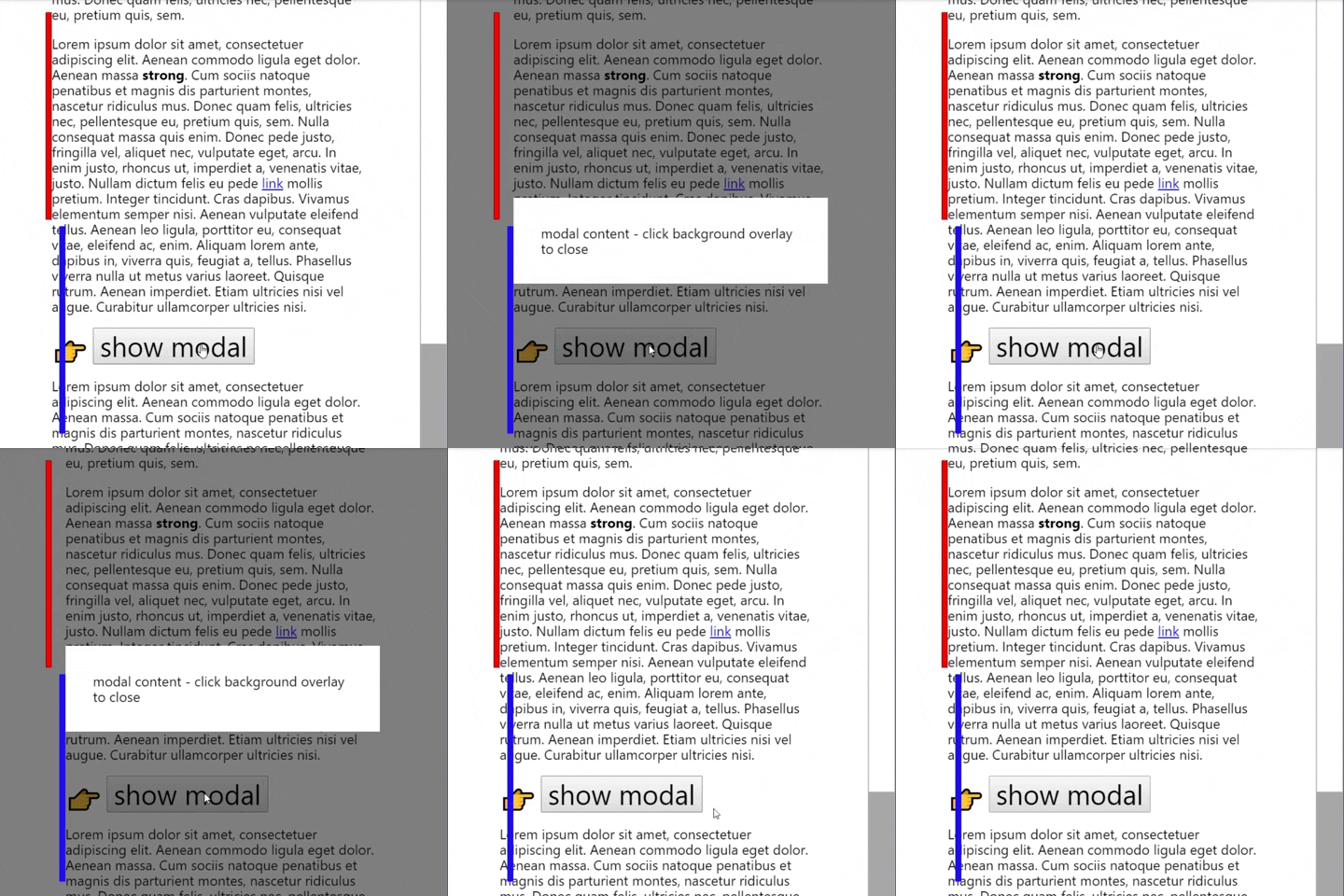
– . , html, .
. , (, Chrome Android). .
_bodyScrollControl()
//
let marginSize = window.innerWidth - html.clientWidth;
//         ( html)
if (marginSize) {
    html.style.marginRight = marginSize + "px";
}
//
html.style.marginRight = "";
close() ? , CSS , .
№7. , visibility:hidden .
: visibility:hidden . , , , , .
- CSS-
.hystmodal—moved-.hystmodal--active
.hystmodal--moved{
    visibility: visible;
}- «transitionend» .
`.hystmodal—active, css-. , «transitionend», .
: :
close(){
    if (!this.isOpened) {
        return;
    }
    this.openedWindow.classList.add("hystmodal--moved");
    this.openedWindow.addEventListener("transitionend", this._closeAfterTransition);
    this.openedWindow.classList.remove("hystmodal--active");
}

_closeAfterTransition(){
    this.openedWindow.classList.remove("hystmodal--moved");
    this.openedWindow.removeEventListener("transitionend", this._closeAfterTransition);
    HystModal._shadow.classList.remove("hystmodal__shadow--show");
    this.openedWindow.setAttribute('aria-hidden', 'true');
    this.focusContol();
    this._bodyScrollControl();
    this.isOpened = false;
}
, _closeAfterTransition() . , transitionend , removeEventListener , .
, , this._closeAfterTransition() .
, addEventListener, this , , this.
//
this._closeAfterTransition = this._closeAfterTransition.bind(this)
2.2
– .hystmodal__wrap. .hystmodal__wrap :
document.addEventListener("click", function (e) {
    const wrap = e.target.classList.contains('hystmodal__wrap');
    if(!wrap) return;
    e.preventDefault();
    this.close();
}.bind(this));
, .
№8. , ( ), .
, . , , . , .
, , click , .hystmodal__wrap.
html, div .hystmodal__window . div .
addEventListener : mousedown mouseup .hystmodal__wrap. eventsFeeler()
document.addEventListener('mousedown', function (e) {
    /**
    *      .hystmodal__wrap,
    *      this._overlayChecker
    */
    if (!e.target.classList.contains('hystmodal__wrap')) return;
    this._overlayChecker = true;
}.bind(this));

document.addEventListener('mouseup', function (e) {
    /**
    *       .hystmodal__wrap,
    *       ,
    *   this._overlayChecker
    */
    if (this._overlayChecker && e.target.classList.contains('hystmodal__wrap')) {
        e.preventDefault();
        !this._overlayChecker;
        this.close();
        return;
    }
    this._overlayChecker = false;
}.bind(this));
2.3
: focusContol() , focusCatcher(event) .
js- «Micromodal» (Indrashish Ghosh). :
1. css ( init()):
//  init
this._focusElements = [
    'a[href]',
    'area[href]',
    'input:not([disabled]):not([type="hidden"]):not([aria-hidden])',
    'select:not([disabled]):not([aria-hidden])',
    'textarea:not([disabled]):not([aria-hidden])',
    'button:not([disabled]):not([aria-hidden])',
    'iframe',
    'object',
    'embed',
    '[contenteditable]',
    '[tabindex]:not([tabindex^="-"])'
];
2. focusContol() , . – this.starter:
focusContol(){
    /**
     *   ,  ,
     * .   .
     */
    const nodes = this.openedWindow.querySelectorAll(this._focusElements);
    if (this.isOpened && this.starter) {
        this.starter.focus();
    } else {
        if (nodes.length) nodes[0].focus();
    }
}
3. focusCatcher() . , , ( Tab Shift+Tab ).
focusCatcher:
focusCatcher(e){
    /**          TAB
     *      .
     */

    //
    const nodes = this.openedWindow.querySelectorAll(this._focusElements);

    //
    const nodesArray = Array.prototype.slice.call(nodes);

    //    ,
    if (!this.openedWindow.contains(document.activeElement)) {
        nodesArray[0].focus();
        e.preventDefault();
    } else {
        const focusedItemIndex = nodesArray.indexOf(document.activeElement)
        if (e.shiftKey && focusedItemIndex === 0) {
            //
            focusableNodes[nodesArray.length - 1].focus();
        }
        if (!e.shiftKey && focusedItemIndex === nodesArray.length - 1) {
            //
            nodesArray[0].focus();
            e.preventDefault();
        }
    }
}
, :
№9. IE11 Element.closest() Object.assign().
Element.closest, closest matches MDN.
, webpack, element-closest-polyfill .
Object.assign, babel- @babel/plugin-transform-object-assign
3.
, , hystModal MIT-. 3 gzip. .
hystModal, :
- (/ , , )
- ( ( ))
- - , ( ).
- - CSS
- CSS JS Webpack.